
Knowledge Base
Tracker and reports
I am using a caching plugin and Slimstat is not recording any visits. What should I do?
Go to Slimstat > Settings > General and set Tracking Mode to Client Side. Don’t forget to invalidate/clear your plugin’s cache, to let Slimstat add its tracking code to all the newly cached pages. Also, if you’re using W3 Total Cache, make sure to exclude wp-slimstat.min.js from the minifier: our code is already minified, and it looks like W3TC breaks something when it tries to minify it again.
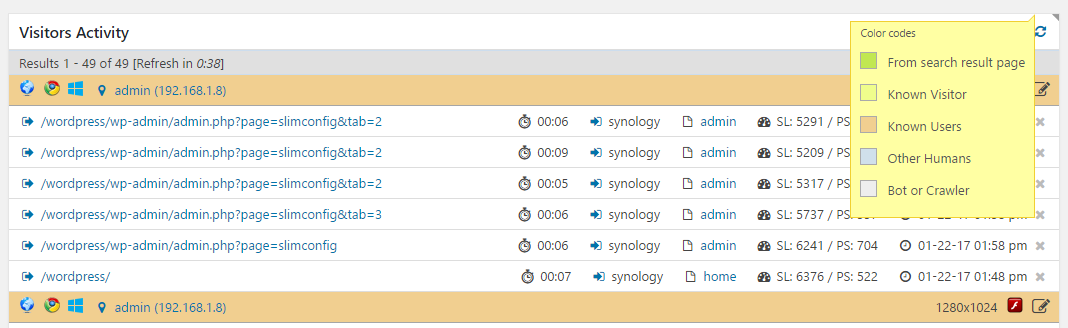
Where can I find a legend explaining what those color-coded entries mean?
On some reports you will see a little triangle icon in the top right-hand corner: simply hover over this icon to reveal a tooltip providing more information about that report. In the Access Log, the little icon can be hovered to access the legend that explains how to read the color-coded entries listed in that report, as shown here below.
How do I use all those filters in the dropdown menu?
Here’s a brief description of what they mean. Please remember that you can access the same information directly from within the admin, by ‘pulling’ the Help tab that should appear in the top right hand corner.
Basic filters:
browser: user agent (Firefox, Chrome, …)country code: 2-letter code (us, ru, de, it, …)ip: visitor’s public IP addresssearch terms: keywords visitors used to find your website on a search enginelanguage code: please refer to the language culture names (first column) for more informationoperating system: accepts identifiers like win7, win98, macosx, …; please refer to this manual page for more information about these codespermalink: URL accessed on your sitereferer: complete URL of the referrer pagevisitor's name: visitor’s name according to the cookie set by WordPress after leaving a commentvisitor's email:
Advanced filters:
browser capabilities: plugins or extensions installed by that user (flash, java, silverlight…)browser version: user agent version (9.0, 11, …)browser type: 1 = search engine crawler, 2 = mobile device, 3 = syndication reader, 0 = all otherscolor depth: visitor’s screen’s color depth (8, 16, 24, …)css version: what CSS standard was supported by that browser (1, 2, 3 and other integer values)pageview attributes: this field is set to [pre] if the resource has been accessed through Link Prefetching or similar techniquespost author: author associated to that post/page when the resource was accessedpost category id: ID of the category/term associated to the resource, when availableprivate ip: visitor’s private IP address, if availableresource content type: post, page, cpt:custom-post-type, attachment, singular, post_type_archive, tag, taxonomy, category, date, author, archive, search, feed, home; please refer to the Conditional Tags manual page for more informationscreen resolution: viewport width and height (1024×768, 800×600, …)visit id: generally used in conjunction with ‘is not empty’, identifies human visitors
Shortcodes
This is a list of popular shortcodes. Please refer to the items here above to learn how to customize them.
Number of Unique IPs this month
1699Number of Human Unique IPs from the beginning
450Number of page views for the current page/post
26Number of page views received today
29Number of page views received yesterday
128Number of unique human visitors this month
1699Number of users currently online
0Number of page views in the last 5 minutes
0Number of page views from the beginning
14491List of popular URLs this month
- /
- /product-category/uncategorized/#primary
- Features
- Contact Us
- Purchase
- Why More Metrics Rarely Mean Better Analytics Decisions
- Blog
- /product-category/uncategorized/
- Examples of Frequently Used Shortcodes in WP Slimstat
- /blog/%e2%80%9dhttps:/wp-slimstat.com/wp-content/themes/slimstats/assets/fonts/inter-v12-latin-300.woff2%e2%80%b3
- How to Audit Analytics Setup WordPress Sites: A Simple Checklist
- Features
- Big News! SlimStat Pro
- Contact Us
- slimstat_filter_pre_tracking_js
- Web Analytics Business Growth: Turning Data Into Better Decisions
- Choosing the Right Analytics Strategy for Your Website in 2026
- Guide to Upgrading to SlimStat Pro
- /category/educational/%e2%80%9dhttps:/wp-slimstat.com/wp-content/themes/slimstats/assets/fonts/inter-v12-latin-regular.woff2%e2%80%b3
- Purchase
- Purchase
- 10 AI Prompts For Website analytics
- My account
- Support
- Best Web Analytics Tools for Business Growth in 2026
- /category/news/
- Difference Between Sessions vs Users vs Pageviews
- What Is a Referrer Web Analytics?
- Purchase
- What Are Privacy Focused Analytics Tools?
- My account
- How to Track Outbound Links WordPress
- Cart
- How To Reduce Analytics Bloat and Speed Up Your WordPress Site
- Knowledge Base
- Self Hosted vs Cloud Analytics: Which Is Better for Your Website?
- Understanding User Intent Through Behavior Analytics
- How to Monitor User Activity on WordPress
- How to View WordPress Stats Without Jetpack
- Event Tracking vs Pageview Tracking: What’s the Difference and Why It Matters
- What Makes an Analytics Tool GDPR Compliant?
- Cart
- How to Track Page Views in WordPress
- Affiliate Dashboard
- My account
- Slimstat 5.4 + PRO 1.2 — Real-Time Attention, Real Privacy: WordPress Analytics Update
- What Is Server-Side Tracking and Why It Matters for WordPress?
- What Is Time on Page Analytics?
- Understanding Exit Rate vs Bounce Rate
- Data Ownership website: Why It Matters for Your Website
- FAQ
- My account
- Purchase
- What Is Bounce Rate in Analytics and Why It Matters
- How to Track Users Without Cookies (Legally)
- Purchase
- What Privacy First Analytics Really Means for Businesses
- Terms and Conditions
- How To Track User Journeys in WordPress (Step by Step)
- Checkout
- Real Time Analytics Explained & Why It’s Useful
- Affiliate Program
- Why Google Analytics May Not Be Right for Your WordPress Site
- /?utm_source=veronalabscom&utm_medium=link&utm_campaign=home
- Heatmaps vs Scrollmaps: What’s the Difference?
- Is Google Analytics GDPR Compliant in 2025?
- Installation Guide
- Troubleshooting SlimStat Pro License Activation
- Top 5 WordPress Analytics Reports to Check Weekly
- WordPress Visitor Analytics: What You Can Learn
- The Truth About Analytics Sampling in Web Analytics
- Choosing the Right Analytics Strategy for Your Website in 2026
- Big Changes! SlimStat v5.1
- Documentation
- My account
- How To Build a Privacy First Analytics Stack for Small Businesses
- Real-Time Analytics in WordPress: What You Need to Know
- Support & Refund Policy
- /wp-login.php?redirect_to=https://wp-slimstat.com/wp-admin/&reauth=1
- 10 Essential Web Analytics Metrics Explained
- Analytics for User Experience: How Data Helps You Design Better Websites
- Why Real Time Analytics Is a Competitive Advantage for Small Sites
- Website Speed and Analytics: Are They Related?
- SlimStat 5.2.11 — WordPress Real-time analytics that just
- My account
- My account
- Slimstat and Cache Plugin Troubleshooting
- Web Analytics Business Growth: Turning Data Into Better Decisions
- How to Audit Analytics Setup WordPress Sites: A Simple Checklist
- Where can I find a legend that explains what those color-coded entries mean?
- My account
- How to Get the Usernames of Visitors to a Specific Page
- Creating Your First SlimStat Add-on
- slimstat_reports_info
- http://(select(0)from(select(sleep(15)))v)/*'%20(select(0)from(select(sleep(15)))v)%20'%20(select(0)from(select(sleep(15)))v)%20*/
- /?ref=1564
- Big News! SlimStat Pro
- Blog
- Blog
- Client Side vs Server Side Analytics
- How to Add Analytics to WordPress (Beginner’s Guide)
- My account
- My account
- My account
- My account
- Mastering WP Slimstat Shortcodes
- slimstat_get_results_sql
- http://0'XOR(if(now()=sysdate(),sleep(15),0))XOR'Z
- About
- Affiliate Program
- What does “Single Site” license mean?
- How Web Analytics Works (Simple Explanation)
- My account
- My account
- My account
- Privacy Policy
- How to Use the Slimstat Tracker in External PHP Scripts
- How to Enable and View the Heatmap
- How to integrate with GDPR banner plugins?
- WP SlimStat Version 5.2 Release Notes
- just $3/year
- /better-analytics-decisions-not-more-metrics/%03%04%c4%bf
- Blog
- Cart
- Checkout
- Can I export reports from SlimStat?
- My account
- My account
- My account
- My account
- My account
- /resources-category/filters/
- /resources-category/shortcodes/
- Combining Multiple Keys and Values in WP Slimstat Shortcodes
- Database API Methods
- Guide to Upgrading to SlimStat Pro
- Adding Custom Reports to WP Slimstat
- What is a Shortcode in WordPress?
- Services
- How to Provide Admin Access to the SlimStat Support Team
- What Is Web Analytics? Definition, Examples & Tools
- http://0XOR(if(now()=sysdate(),sleep(15),0))XORZ
- http://if(now()=sysdate(),sleep(15),0)
- /%e2%80%9dhttps
- /?s&post_type=resources
- /?utm_source=organic&utm_medium=email
- /?utm_source=wpsmsprocom&utm_medium=link&utm_campaign=footer
- /?utm_source=wpstatisticscom&utm_medium=link&utm_campaign=footer
- Affiliate Dashboard
- Blog
- /contact/%03%04%c4%bf
- Do I need to renew my license?
- How can I change the colors associated to color-coded pageviews (known user, known visitors, search engines, etc)?
- My account
- My account
- My account
- My account
- Privacy Policy
- Retrieving and Processing Data from the Database with PHP
- slimstat_track_exit_212
- slimstat_filter_pageview_data_js
- slimstat_filter_pre_tracking
- slimstat_js_params
- slimstat_track_exit_102
- Slimstat 5.3 – Smarter Charts, Better Tracking
- A New Chapter for WP SlimStat: Welcome to the VeronaLabs Family!
- Can I set up SlimStat for multiple websites?
- Do I need to keep my license updated?
- What support can I expect from you?
- My account
- My account
- My account
- My account
- My account
- My account
- My account
- /product-category/uncategorized/#primary'||DBMS_PIPE.RECEIVE_MESSAGE(CHR(98)||CHR(98)||CHR(98),15)||'
- /resources-category/actions/
- /resources-category/functions-and-api/
- /tag/release/
- Why Small Businesses Need Website Analytics?
- /?s=&post_type=resources
- /?utm_source=betbavd&utm_medium=email
- /?utm_source=betbavd&utm_medium=email
- /blog/essential-web-analytics-metrics-explained/
- /category/alternative-comparison/
- /category/news/%e2%80%9dhttps:/wp-slimstat.com/wp-content/themes/slimstats/assets/fonts/inter-v12-latin-300.woff2%e2%80%b3
- Checkout
- Checkout
- Checkout
- Checkout
- Checkout
- Data Ownership website: Why It Matters for Your Website
- /downloads/export-to-excel/
- Can I export reports from SlimStat?
- How can I manage who sees the reports?
- How do I use all those filters in the dropdown menu?
- What Does “1 Site” Mean In Terms Of Using?
- My account
or as a widget
/ 416(6.80%)
/product-category/uncategorized/#primary 356(5.82%)
Features 319(5.21%) URL: /features/
Contact Us 300(4.90%) URL: /contact/
Purchase 294(4.80%) URL: /pricing/?page=
Why More Metrics Rarely Mean Better Analytics Decisions 233(3.81%) URL: /better-analytics-decisions-not-more-metrics/
Blog 151(2.47%) URL: /blog/
/product-category/uncategorized/ 143(2.34%)
Examples of Frequently Used Shortcodes in WP Slimstat 143(2.34%) URL: /resources/examples-of-frequently-used-shortcodes/
/blog/%e2%80%9dhttps:/wp-slimstat.com/wp-content/themes/slimstats/assets/fonts/inter-v12-latin-300.woff2%e2%80%b3 137(2.24%)
How to Audit Analytics Setup WordPress Sites: A Simple Checklist 130(2.12%) URL: /audit-analytics-setup-wordpress/#primary
Features 122(1.99%) URL: /features/#primary
Big News! SlimStat Pro 121(1.98%) URL: /big-news-slimstat-pro/#primary
Contact Us 121(1.98%) URL: /contact/#primary
slimstat_filter_pre_tracking_js 121(1.98%) URL: /resources/slimstat_filter_pre_tracking_js/
Web Analytics Business Growth: Turning Data Into Better Decisions 119(1.94%) URL: /web-analytics-business-growth/#primary
Choosing the Right Analytics Strategy for Your Website in 2026 113(1.85%) URL: /analytics-strategy-for-your-website-2026/#primary
Guide to Upgrading to SlimStat Pro 113(1.85%) URL: /resources/guide-to-upgrading-to-slimstat-pro/#primary
/category/educational/%e2%80%9dhttps:/wp-slimstat.com/wp-content/themes/slimstats/assets/fonts/inter-v12-latin-regular.woff2%e2%80%b3 111(1.81%)
Purchase 109(1.78%) URL: /pricing/
List of recent search terms
- database
- db
- utm
or as a widget
database Jun 17, 2026 12:37 pm
Referrer: No referrer
db Jun 17, 2026 12:37 pm
Referrer: No referrer
utm Jun 17, 2026 1:03 am
Referrer: No referrer
utm campaign Jun 16, 2026 6:33 pm
Referrer: No referrer
license Jun 15, 2026 8:02 am
Referrer: No referrer
wp-slimstat Jun 9, 2026 3:59 am
Referrer: www.google.com
wp-slimstat Jun 9, 2026 3:58 am
Referrer: www.google.com
refund May 30, 2026 8:59 pm
Referrer: No referrer
List of most active visitors
World Map
Top Countries
 Netherlands
47.69%
Netherlands
47.69%
 United States
21.01%
United States
21.01%
 Japan
6.88%
Japan
6.88%
 Singapore
6.71%
Singapore
6.71%
 China
4.66%
China
4.66%
How can I combine multiple keys and values to create filters?
you can use the &&& operator to concatenate multiple filters. For example, if you want to list the 5 most popular posts on your blog, you would use the following shortcode:
- /
- /product-category/uncategorized/#primary
- /features/
- /contact/
- /pricing/?page=
- /better-analytics-decisions-not-more-metrics/
- /blog/
- /product-category/uncategorized/
- /resources/examples-of-frequently-used-shortcodes/
- /blog/%e2%80%9dhttps:/wp-slimstat.com/wp-content/themes/slimstats/assets/fonts/inter-v12-latin-300.woff2%e2%80%b3
- /audit-analytics-setup-wordpress/#primary
- /features/#primary
- /big-news-slimstat-pro/#primary
- /contact/#primary
- /resources/slimstat_filter_pre_tracking_js/
- /web-analytics-business-growth/#primary
- /analytics-strategy-for-your-website-2026/#primary
- /resources/guide-to-upgrading-to-slimstat-pro/#primary
- /category/educational/%e2%80%9dhttps:/wp-slimstat.com/wp-content/themes/slimstats/assets/fonts/inter-v12-latin-regular.woff2%e2%80%b3
- /pricing/
- /pricing/?utm_source=wp-slimstat&utm_medium=link&utm_campaign=barchart
- /ai-prompts-for-website-analytics/
- /my-account/
- /support/
- /best-web-analytics-tools-2026/
- /category/news/
- /sessions-vs-users-vs-pageviews/
- /referrer-web-analytics/
- /pricing/?utm_source=wp-slimstat&utm_medium=link&utm_campaign=header
- /what-are-privacy-focused-analytics-tools/
- /my-account/orders/
- /track-outbound-links-wordpress/
- /cart/?add-to-cart=1738
- /reduce-analytics-bloat/
- /knowledge-base/
- /self-hosted-vs-cloud-analytics/
- /behavior-analytics-user-intent/
- /wordpress-user-activity-tracking/
- /how-to-view-wordpress-stats-without-jetpack/
- /event-tracking-vs-pageview-tracking/
- /analytics-tool-gdpr-compliant/
- /cart/
- /how-to-track-page-views-in-wordpress/
- /affiliate-dashboard/generate-link/
- /my-account/edit-account/
- /wordpress-analytics-plugin-slimstat-5-4-release-notes/
- /server-side-tracking/
- /time-on-page-analytics/
- /understanding-exit-rate-vs-bounce-rate/
- /data-ownership-website/
- /faq/
- /my-account/view-subscription/5014/
- /pricing/?utm_source=wp-slimstat&utm_medium=link&utm_campaign=adminbar
- /what-is-bounce-rate-in-analytics/
- /how-to-track-users-without-cookies-legally/
- /pricing/?utm_source=wp-slimstat&utm_medium=link&utm_campaign=email
- /privacy-first-analytics/
- /terms-conditions/
- /track-user-journeys-in-wordpress/
- /checkout/
- /real-time-analytics-explained/
- /affiliate-program/
- /why-google-analytics-may-not-be-right-for-your-wordpress-site/
- /?utm_source=veronalabscom&utm_medium=link&utm_campaign=home
- /heatmaps-vs-scrollmaps/
- /is-google-analytics-gdpr-compliant-in-2025/
- /resources/installation-guide/
- /resources/troubleshooting-slimstat-pro-license-activation/
- /wordpress-analytics-reports-2/
- /wordpress-visitor-analytics-what-you-can-learn/
- /analytics-sampling-web-analytics/
- /analytics-strategy-for-your-website-2026/
- /big-changes-slimstat-v5-1/
- /documentation/
- /my-account/view-subscription/8877/
- /privacy-first-analytics-stack-small-businesses/
- /real-time-analytics-wordpress-guide/
- /support-refund-policy/
- /wp-login.php?redirect_to=https://wp-slimstat.com/wp-admin/&reauth=1
- /10-essential-web-analytics-metrics-explained/
- /analytics-for-user-experience/
- /real-time-analytics-competitive-advantage/
- /website-speed-and-analytics/
- /wordpress-analytics-plugin-slimstat-5-2-11-release-notes/
- /my-account/view-order/8876/
- /my-account/view-subscription/5643/
- /resources/i-am-using-w3-total-cache-or-wp-super-cache-hypercache-etc-and-it-looks-like-slimstat-is-not-tra/
- /web-analytics-business-growth/
- /audit-analytics-setup-wordpress/
- /faq/where-can-i-find-a-legend-that-explains-what-those-color-coded-entries-mean/
- /my-account/payment-methods/
- /resources/how-do-i-list-all-the-usernames-who-visited-a-given-page-on-my-site/
- /resources/my-first-slimstat-add-on/
- /resources/slimstat_reports_info/
- http://(select(0)from(select(sleep(15)))v)/*'%20(select(0)from(select(sleep(15)))v)%20'%20(select(0)from(select(sleep(15)))v)%20*/
- /?ref=1564
- /big-news-slimstat-pro/
- /blog/page/2/
- /blog/page/5/
- /client-side-vs-server-side-analytics/
- /how-to-add-analytics-to-wordpress-beginners-guide/
- /my-account/lost-password/
- /my-account/view-order/7336/
- /my-account/view-order/8854/
- /my-account/view-subscription/7908/
- /resources/mastering-wp-slimstat-shortcodes/
- /resources/slimstat_get_results_sql/
- http://0'XOR(if(now()=sysdate(),sleep(15),0))XOR'Z
- /about/
- /affiliate-program/#affiliate-form
- /faq/what-does-1-site-license-mean/
- /how-web-analytics-works-simple-explanation/
- /my-account/edit-address/
- /my-account/view-subscription/8901/
- /my-account/view-subscription/8904/
- /privacy-policy/
- /resources/how-to-call-the-slimstat-tracker-from-an-external-function/
- /resources/how-to-enable-and-view-the-heatmap/
- /resources/how-to-integrate-with-gdpr-banner-plugins/
- /wp-slimstat-version-5-2-release-notes/
- /wphash_ntf_bar/sample-hashbar/
- /better-analytics-decisions-not-more-metrics/%03%04%c4%bf
- /blog/page/4/
- /cart/?add-to-cart=1737
- /checkout/order-received/8801/?key=wc_order_wpWDBjx7GPF0v
- /faq/can-i-export-reports-from-slimstat/
- /my-account/view-order/8540/
- /my-account/view-order/8903/
- /my-account/view-order/8909/
- /my-account/view-subscription/7836/
- /my-account/view-subscription/8855/
- /resources-category/filters/
- /resources-category/shortcodes/
- /resources/can-i-combine-multiple-keys-and-values-to-create-filters/
- /resources/database-api-methods/
- /resources/guide-to-upgrading-to-slimstat-pro/
- /resources/how-do-i-add-my-own-custom-reports-to-slimstat/
- /resources/wordpress-shortcode/
- /services/
- /support/how-to-provide-admin-access-to-the-slimstat-support-team/
- /what-is-web-analytics-definition-examples-tools/
- http://0XOR(if(now()=sysdate(),sleep(15),0))XORZ
- http://if(now()=sysdate(),sleep(15),0)
- /%e2%80%9dhttps
- /?s&post_type=resources
- /?utm_source=organic&utm_medium=email
- /?utm_source=wpsmsprocom&utm_medium=link&utm_campaign=footer
- /?utm_source=wpstatisticscom&utm_medium=link&utm_campaign=footer
- /affiliate-dashboard/
- /blog/page/3/
- /contact/%03%04%c4%bf
- /faq/do-i-need-to-renew-my-license/
- /faq/how-can-i-change-the-colors-associated-to-color-coded-pageviews-known-user-known-visitors-search-engines-etc/
- /my-account/view-order/8596/
- /my-account/view-order/8815/
- /my-account/view-order/8835/
- /my-account/view-order/8893/
- /privacy-policy/?ss_ad_code=g_bizstudy
- /resources/retrieving-and-outputting-data-from-the-database-in-php/
- /resources/slimstat-track-exit-212/
- /resources/slimstat_filter_pageview_data_js/
- /resources/slimstat_filter_pre_tracking/
- /resources/slimstat_js_params/
- /resources/slimstat_track_exit_102/
- /wordpress-analytics-plugin-slimstat-5-3-release-notes/
- /a-new-chapter-for-wp-slimstat-welcome-to-the-veronalabs-family/
- /faq/can-i-set-up-slimstat-for-multiple-websites/
- /faq/do-i-need-to-keep-my-license-updated/
- /faq/what-support-can-i-expect-from-you/
- /my-account/orders/%e2%80%9dhttps:/wp-slimstat.com/wp-content/themes/slimstats/assets/fonts/inter-v12-latin-300.woff2%e2%80%b3/%e2%80%9dhttps:/wp-slimstat.com/wp-content/themes/slimstats/assets/fonts/inter-v12-latin-300.woff2%e2%80%b3/%e2%80%9dhttps:/wp-slimstat.com/wp-content/themes/slimstats/assets/fonts/inter-v12-latin-regular.woff2%e2%80%b3/%e2%80%9dhttps:/wp-slimstat.com/wp-content/themes/slimstats/assets/fonts/inter-v12-latin-regular.woff2%e2%80%b3/%e2%80%9dhttps:/wp-slimstat.com/wp-content/themes/slimstats/assets/fonts/inter-v12-latin-300.woff2%e2%80%b3/%e2%80%9dhttps:/wp-slimstat.com/wp-content/themes/slimstats/assets/fonts/inter-v12-latin-regular.woff2%e2%80%b3/%e2%80%9dhttps:/wp-slimstat.com/wp-content/themes/slimstats/assets/fonts/inter-v12-latin-300.woff2%e2%80%b3/%e2%80%9dhttps:/wp-slimstat.com/wp-content/themes/slimstats/assets/fonts/inter-v12-latin-regular.woff2%e2%80%b3/%e2%80%9dhttps:/wp-slimstat.com/wp-content/themes/slimstats/assets/fonts/inter-v12-latin-300.woff2%e2%80%b3/%e2%80%9dhttps:/wp-slimstat.com/wp-content/themes/slimstats/assets/fonts/inter-v12-latin-300.woff2%e2%80%b3/%e2%80%9dhttps:/wp-slimstat.com/wp-content/themes/slimstats/assets/fonts/inter-v12-latin-regular.woff2%e2%80%b3/%e2%80%9dhttps:/wp-slimstat.com/wp-content/themes/slimstats/assets/fonts/inter-v12-latin-300.woff2%e2%80%b3/%e2%80%9dhttps:/wp-slimstat.com/wp-content/themes/slimstats/assets/fonts/inter-v12-latin-regular.woff2%e2%80%b3/%e2%80%9dhttps:/wp-slimstat.com/wp-content/themes/slimstats/assets/fonts/inter-v12-latin-regular.woff2%e2%80%b3/%e2%80%9dhttps:/wp-slimstat.com/wp-content/themes/slimstats/assets/fonts/inter-v12-latin-regular.woff2%e2%80%b3/%e2%80%9dhttps:/wp-slimstat.com/wp-content/themes/slimstats/assets/fonts/inter-v12-latin-300.woff2%e2%80%b3/%e2%80%9dhttps:/wp-slimstat.com/wp-content/themes/slimstats/assets/fonts/inter-v12-latin-300.woff2%e2%80%b3/%e2%80%9dhttps:/wp-slimstat.com/wp-content/themes/slimstats/assets/fonts/inter-v12-latin-300.woff2%e2%80%b3/%e2%80%9dhttps:/wp-slimstat.com/wp-content/themes/sli
- /my-account/view-order/8571/
- /my-account/view-order/8660/
- /my-account/view-order/8787/
- /my-account/view-order/8791/
- /my-account/view-order/8801/
- /my-account/view-subscription/5400/
- /product-category/uncategorized/#primary'||DBMS_PIPE.RECEIVE_MESSAGE(CHR(98)||CHR(98)||CHR(98),15)||'
- /resources-category/actions/
- /resources-category/functions-and-api/
- /tag/release/
- /why-small-businesses-need-website-analytics/
- /?s=&post_type=resources
- /?utm_source=betbavd&utm_medium=email
- /?utm_source=betbavd&utm_medium=email
- /blog/essential-web-analytics-metrics-explained/
- /category/alternative-comparison/
- /category/news/%e2%80%9dhttps:/wp-slimstat.com/wp-content/themes/slimstats/assets/fonts/inter-v12-latin-300.woff2%e2%80%b3
- /checkout/order-received/8720/
- /checkout/order-received/8787/?key=wc_order_aRUjAsYdtiBfz
- /checkout/order-received/8791/?key=wc_order_vjKS0cRSsg9D5
- /checkout/order-received/8812/?key=wc_order_Fn8VK8ay9Cng9
- /checkout/order-received/8815/?key=wc_order_KgexPR8rBwtvC
- /data-ownership-website/?utm_source=chatgpt.com
- /downloads/export-to-excel/
- /faq/can-i-export-reports-from-slimstat/#primary
- /faq/how-can-i-manage-who-sees-the-reports/
- /faq/how-do-i-use-all-those-filters-in-the-dropdown-menu/
- /faq/what-does-1-site-mean-in-terms-of-using/
- /my-account/view-order/8900/
Actions
slimstat_track_pageview
do_action( 'slimstat_track_pageview', self::$stat );The $stat parameter contains all the columns to be saved in the database:
- id
- ip
- other_ip
- username
- country
- referer
- resource
- searchterms
- plugins
- notes
- visit_id
- server_latency
- page_performance
- browser
- browser_version
- browser_type
- platform
- language
- user_agent
- resolution
- screen_width
- screen_height
- content_type
- category
- author
- content_id
- outbound_resource
- dt
slimstat_track_exit_102
do_action( 'slimstat_track_exit_102' );Called by the Javascript tracker when the data received from the browser is not well-formed.
slimstat_track_exit_103
do_action( 'slimstat_track_exit_103' );Called by the Javascript tracker when the control code (nonce) sent by the browser is not valid for the payload associated with it.
slimstat_track_exit_212
do_action( 'slimstat_track_exit_212', self::$stat, $browser );Called by the server-side tracker when a pageview is not recorded because the browser is blacklisted. It passes the array with all the pageview details, and the array with all the browser details.
slimstat_track_success
do_action( 'slimstat_track_success' );Called by the Ajax handler when a new event is tracked without any errors.
wp_slimstat_custom_report
do_action( 'wp_slimstat_custom_report' );Called in the Custom Reports tab to append your own reports to the screen. The hooked function will need to echo the HTML markup to display the report, including the report header, pagination and other details.
Filters
slimstat_track_pageview
do_action( 'slimstat_track_pageview', self::$stat );The $stat parameter contains all the columns to be saved in the database:
- id
- ip
- other_ip
- username
- country
- referer
- resource
- searchterms
- plugins
- notes
- visit_id
- server_latency
- page_performance
- browser
- browser_version
- browser_type
- platform
- language
- user_agent
- resolution
- screen_width
- screen_height
- content_type
- category
- author
- content_id
- outbound_resource
- dt
slimstat_track_exit_102
do_action( 'slimstat_track_exit_102' );Called by the Javascript tracker when the data received from the browser is not well-formed.
slimstat_track_exit_103
do_action( 'slimstat_track_exit_103' );Called by the Javascript tracker when the control code (nonce) sent by the browser is not valid for the payload associated to it.
slimstat_track_exit_212
do_action( 'slimstat_track_exit_212', self::$stat, $browser );Called by the server-side tracker when a pageview is not recorded because the browser is blacklisted. It passes the array with all the pageview details, and the array with all the browser details.
slimstat_track_success
do_action( 'slimstat_track_success' );Called by the Ajax handler when a new event is tracked without any errors.
wp_slimstat_custom_report
do_action( 'wp_slimstat_custom_report' );Called in the Custom Reports tab to append your reports to the screen. The hooked function will need to echo the HTML markup to display the report, including the report header, pagination, and other details.