
Bounce rate is the percentage of visits that view exactly one page and leave: 60 single-page visits out of 100 total visits is a 60% bounce rate. Google Analytics 4 redefines the metric as the inverse of engagement rate, which is not the Universal Analytics definition that most published benchmarks were built on.
| Dimension | Universal Analytics | Google Analytics 4 | SlimStat Analytics |
|---|---|---|---|
| A bounce is | A session with exactly one pageview | Any session that was not engaged | A visit with exactly one pageview |
| Engagement time counted | No | Yes, 10 seconds or more marks a session engaged | No |
| Session window | 30 minutes of inactivity | 30 minutes, configurable | 30 minutes from the first pageview, configurable |
| Bot traffic | Optional exclusion setting | Excluded automatically | Excluded before the calculation |
| Where the number appears | Retired in July 2023 | Reports, under Engagement | Audience Overview, in the free plugin |
How Bounce Rate Is Calculated
The bounce rate formula divides single-page visits by total visits and multiplies by 100. A site recording 400 single-page visits across 1,000 total visits reports a 40% bounce rate. The denominator is every visit in the reporting window, never every pageview, and that denominator is what separates bounce rate from exit rate.
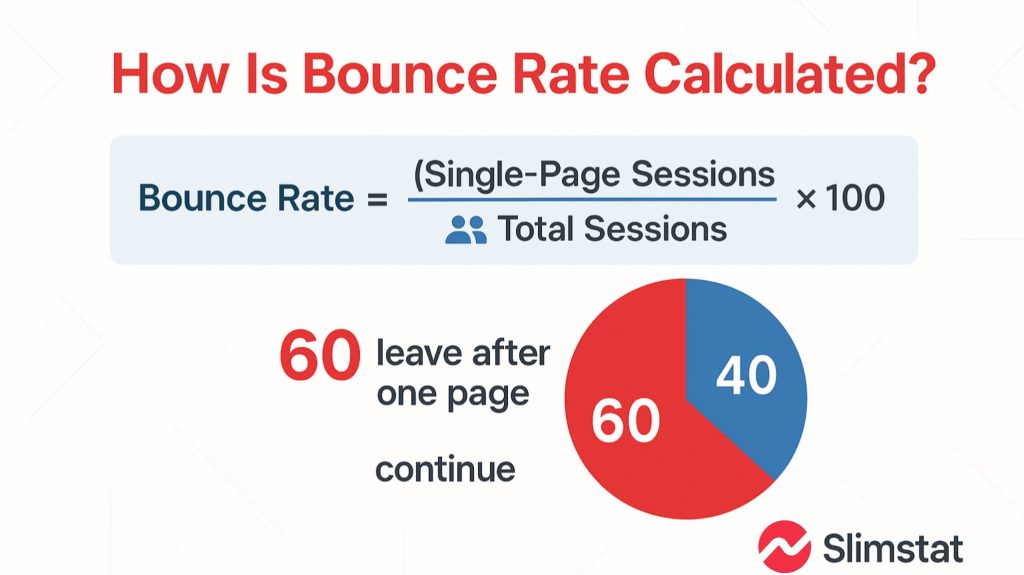
Bounce Rate = (Single-Page Visits ÷ Total Visits) × 100
A visit that loads one page, stays eleven minutes and leaves still counts as a bounce, because the formula counts pages rather than time. Exit rate divides exits from one page by that page’s own pageviews, and sessions vs users vs pageviews explains why those totals differ.
How Google Analytics 4 Changed the Definition
Google Analytics 4 reports bounce rate as 100% minus engagement rate, so a bounce in GA4 is any session that lasted under 10 seconds, fired no key event, and produced fewer than 2 pageviews. Benchmarks published before Universal Analytics stopped processing data in July 2023 describe the older single-page definition instead.
Identical traffic therefore scores two different bounce rates depending on which definition produced the number. A ten-second read of a recipe page is engaged in GA4 and a bounce under the older definition, so never compare a GA4 figure against a benchmark table without checking which definition that table used.
What Counts as a Good Bounce Rate
No single good bounce rate exists across page types, because the number depends on what the page is for. Blog posts and glossary pages routinely sit between 60% and 90% and are working correctly, while a multi-step checkout above 40% usually signals a problem worth investigating. The ranges below are directional, not certified standards.
- Blog post, glossary entry, news article — 60% to 90%; readers get the answer and leave.
- Landing page built for one action — 60% to 90%; measure the conversion instead.
- Product or category page — 30% to 55%; higher usually means intent mismatch.
- Homepage — 30% to 50%; a homepage exists to route visitors onward.
- Checkout or multi-step form — under 40%; anything higher deserves investigation.
When a High Bounce Rate Is the Correct Result
A high bounce rate is the correct result whenever the page is designed to answer a question completely and send the visitor away satisfied. Glossary entries, contact pages, opening-hours pages and single-action landing pages all earn high bounce rates by working properly, so judge those pages on goal completion instead of on bounce rate.
What Makes Bounce Rate Rise
Four causes account for most sudden bounce-rate jumps: a slow or broken page, a mismatch between the search snippet and the page content, a layout that fails on phones, and tracking that fires incorrectly. Check the tracking cause first, because a measurement fault is the cheapest of the four to rule out.
- Page speed — a page taking several seconds to render loses visitors before content appears.
- Intent mismatch — a title promising a price list that opens on a blog post sends visitors back to the results.
- Mobile layout — unreadable text, or a pop-up that cannot be closed, ends the visit immediately.
- Measurement faults — a tracker that never fires on the second page records a two-page visit as a bounce, and editors reloading drafts inflate the figure unless you exclude your own visits.
Where Bounce Rate Appears in SlimStat Analytics
SlimStat Analytics reports bounce rate in the Audience Overview panel, alongside single-page visits, pageviews per visit and a separate bots count. The calculation uses the single-page definition rather than the GA4 engagement definition, and bot traffic is excluded before the division, so the figure describes human visits only.
A companion Top Bounce Pages report lists the entry pages producing those single-page visits, and both reports ship in the free plugin. SlimStat stores the underlying rows in your own WordPress database, which makes it a Google Analytics alternative for WordPress that keeps the older, simpler bounce definition.
Frequently Asked Questions
Three questions follow every bounce rate definition: whether a specific figure is good, what a very high figure means, and whether bounce rate affects search rankings. Each answer below depends on which definition produced the number, so confirm which tool reported the figure before acting on it.
Is a 40% bounce rate good?
A 40% bounce rate is good for a homepage, category page or checkout funnel, and unusually low for a blog post. Compare the figure against that page’s job, not a site-wide average.
What does an 80% bounce rate mean?
An 80% bounce rate means 8 visits in 10 viewed one page and left. On a glossary or news page that figure is normal; on a product page it usually points to intent mismatch or a slow load.
Does bounce rate affect SEO?
Google has stated that it does not use analytics bounce rate as a ranking signal, so a high bounce rate does not directly lower rankings. The causes behind a rising bounce rate — slow pages, intent mismatch — do affect search performance, which is why the metric is worth watching.