
Bounce rate and exit rate differ in one place: the denominator. A page with 1,000 pageviews that ended 300 sessions has a 30% exit rate, measured against its own traffic; bounce rate measures single-page visits against every visit to the site. Every bounce is an exit; not every exit is a bounce.
| Dimension | Bounce rate | Exit rate |
|---|---|---|
| What it counts | Visits with exactly one pageview | Sessions that ended on this page |
| Denominator | All visits in the reporting period | Pageviews of that one page |
| Scope | Site-wide, or per entry page | Always a single page |
| Overlap | Every bounce is also an exit | Most exits are not bounces |
| In SlimStat | Audience Overview, as a percentage | Top Exit Pages, as a ranked list |
How bounce rate is calculated
Bounce rate divides single-page visits by total visits and multiplies by 100. SlimStat computes it over human traffic only, excluding bots from both halves of the fraction, and shows the result in the Audience Overview report next to the raw single-page visit count it was derived from.
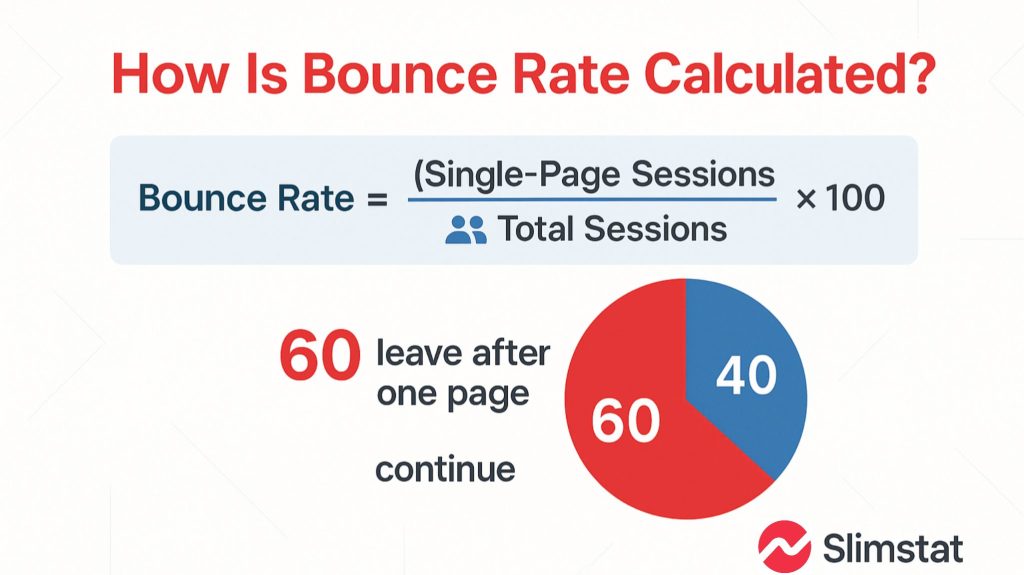
A visit, in SlimStat, is a group of pageviews from one visitor inside a 30-minute window, and one pageview in that window is a bounce. The definition ignores duration, so a 10-second bounce and a 10-minute bounce count identically. What bounce rate actually measures covers the metric alone.
How exit rate is calculated
Exit rate divides the sessions that ended on a page by that page’s own pageviews, then multiplies by 100. A checkout step viewed 4,000 times that was the last page seen in 1,200 of those sessions exits at 30%. The denominator is the page’s own traffic, never the site’s total.
Nothing about an exit implies failure, since every session ends somewhere. The question is whether a page ends more sessions than its role warrants: a thank-you page ending 90% of the sessions reaching it works as designed, a checkout step doing the same does not.
Why one page can have a low bounce rate and a high exit rate
A page reached mid-journey can carry a high exit rate and a near-zero bounce rate, because bounces only count sessions that started on that page. Checkout steps, pricing pages and internal search results are the standard example: visitors arrive from elsewhere, so few sessions begin there, yet many end there.
The reverse is just as common: a post ranking for a definitional query can bounce at 80% and still be doing its job, provided the visitor arrived, got the answer and left satisfied. Both metrics are ratios, so a 100% bounce rate over 12 visits is noise — see sessions vs users vs pageviews.
What each metric tells you to fix
Bounce rate points at the match between a page and the traffic arriving at it: headline, search intent, load time, first screen. Exit rate points at what happens after arrival: a missing next step, a form asking too much, a price revealed later than the visitor expected.
- Informational page, high bounce rate: usually fine, because the answer was on the page.
- Checkout step, high exit rate: investigate, because that page exists to pass visitors onward.
Where both metrics appear in SlimStat
SlimStat Analytics reports bounce rate as a percentage in the Audience Overview panel, beside single-page visits and pageviews per visit. Exit rate is published as a percentage nowhere; the Site Analysis screen instead ranks Top Exit Pages, Top Entry Pages and Top Bounce Pages by URL.
Those reports ship in the free plugin, listed on wordpress.org since 2010 and running on 70,000+ sites at a 4.8 rating across 817 reviews. Both numbers come from your own WordPress tables, unsampled. Exclude your own visits before reading either, then weigh SlimStat as a Google Analytics alternative.
Frequently asked questions
Bounce rate and exit rate get asked about together because both describe leaving, and the answers below separate them one query at a time. Each covers a distinct confusion: which sessions each metric counts, when the two diverge, and what SlimStat publishes.
What is the main difference between exit rate and bounce rate?
Bounce rate counts sessions that began and ended on the same page, as a share of all visits. Exit rate counts sessions that ended on a given page, as a share of that page’s pageviews.
Can exit rate be higher than bounce rate on the same page?
Yes, and on most pages it is. Exit rate includes every session that ended on the page, whatever route led there, while bounce rate includes only sessions that both started and ended there.
Is a high bounce rate always bad?
No. On a page that answers one question — an address, an opening time, a definition — a high bounce rate is consistent with a satisfied visitor. It is a problem on pages whose purpose is to send the visitor onward.
Does SlimStat show an exit rate percentage?
No. SlimStat reports bounce rate as a percentage in Audience Overview, while exits appear as the Top Exit Pages ranking on the Site Analysis screen. You can derive the rate by dividing a page’s exits by its pageviews.