
For WooCommerce stores
WooCommerce analytics that show what sells
See which channels, campaigns and products bring in sales, without leaving WordPress. SlimStat links each order to the tracked visit before it where consent allows, and tells you plainly which orders it could not link.
Free 6 includes sales, products, channels and sources. Pro 3 adds campaigns, landing pages, devices and coupons, from $39 a year. Needs WooCommerce 8.3 or newer.
Feature preview: Free 6.0.0 and Pro 3.0.0 are not yet published. Check the available package before installing or buying for a new feature. See release status and changes.
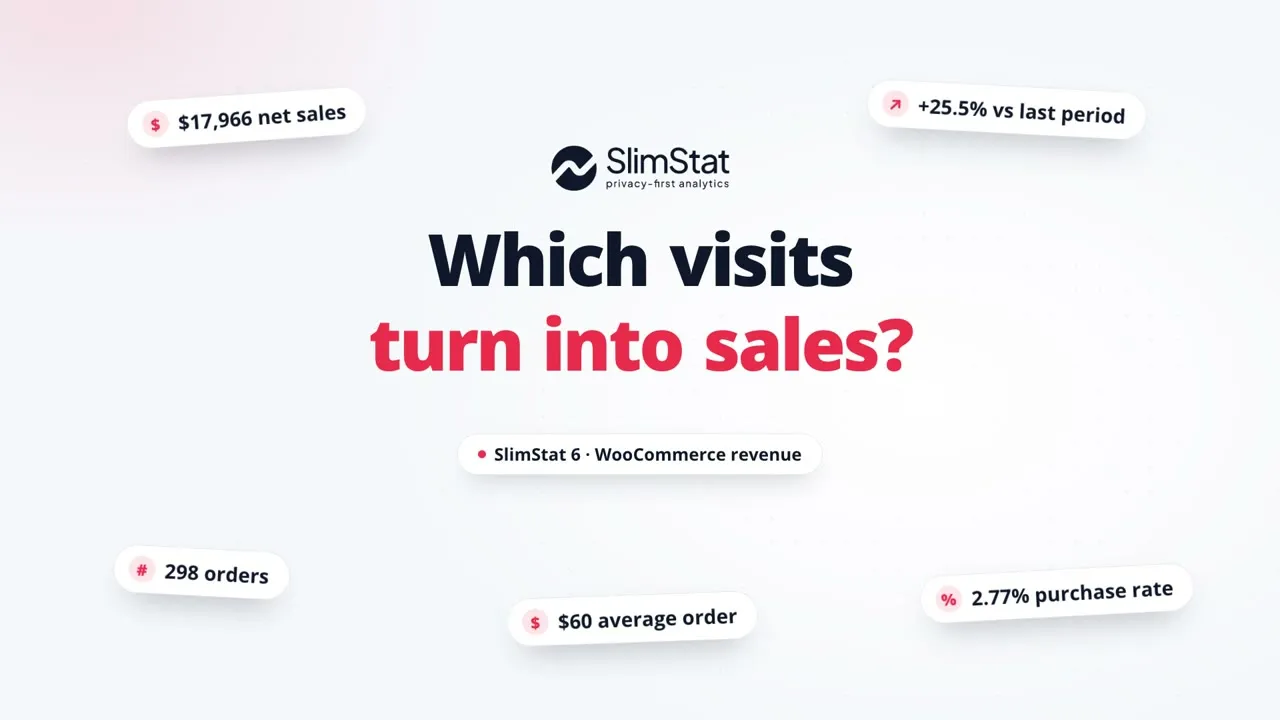
Questions your WooCommerce reports answer
Ecommerce sits in the SlimStat menu beside your traffic reports. Every figure comes from WooCommerce orders, and every link to a visit comes from SlimStat's own tracking.
Free and Pro
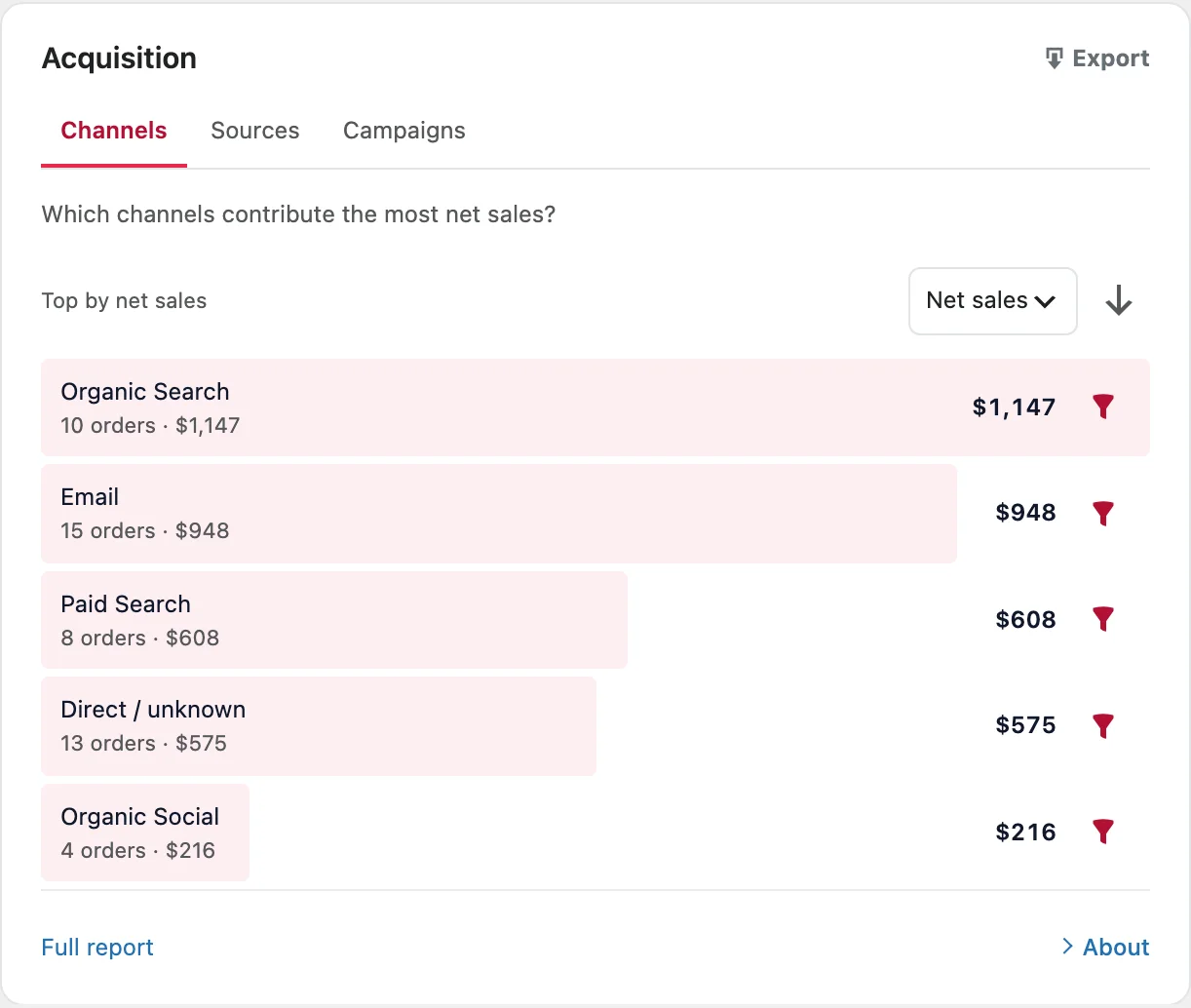
Which channel brought the sale?
Compare organic search, email, paid search, social and direct visits by orders and net sales. Open a channel to see its sources, such as one search engine or one newsletter.
Pro adds a Campaigns tab for your UTM-tagged links, so the autumn email and the spring ad stop sharing one line.
Free and Pro
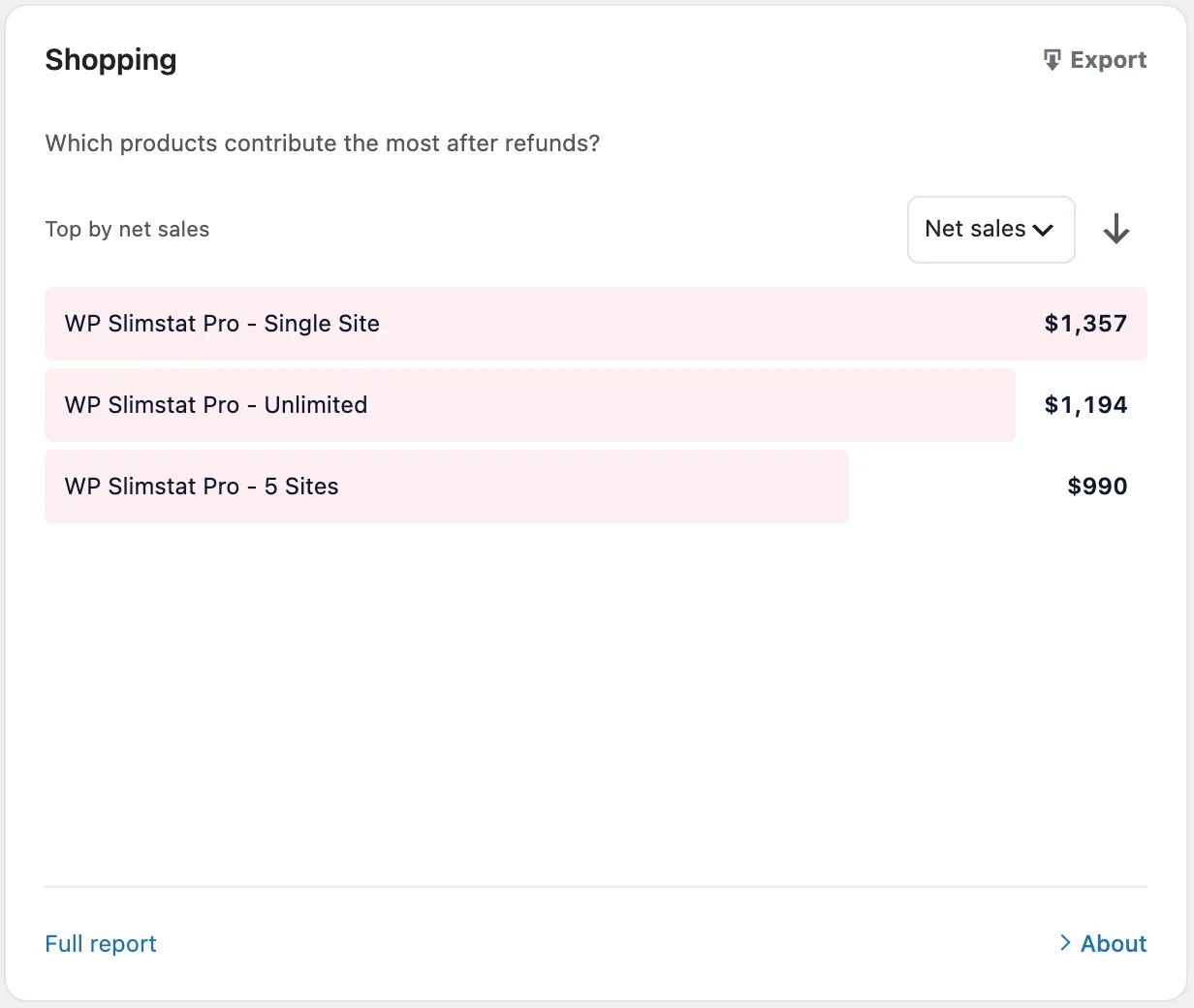
Which products earn after refunds?
Products are ranked by what they brought in after discounts and refunded lines, not by what left the shelf. A bestseller that keeps coming back drops to where it belongs.
Refunds that WooCommerce records only as an amount stay unallocated rather than spread across products by guesswork.
Pro
Which campaign, landing page or device leads to orders?
Pro splits the same net sales and orders five more ways.
- Campaign
- How much did the orders from your autumn-sale email add up to?
- Landing page
- Which first pages started the visits that bought?
- Device
- How do orders and net sales split between phone and desktop visits? A gap is a place to look, not a verdict.
- Customer
- How do guest checkouts compare with registered accounts?
- Coupon
- Which codes appear on orders, how much they discounted, and what was refunded.
Net sales, orders and purchase rate, defined where you read them
The overview answers "how did the store do?" first, and prints the definition of each number on the report itself.
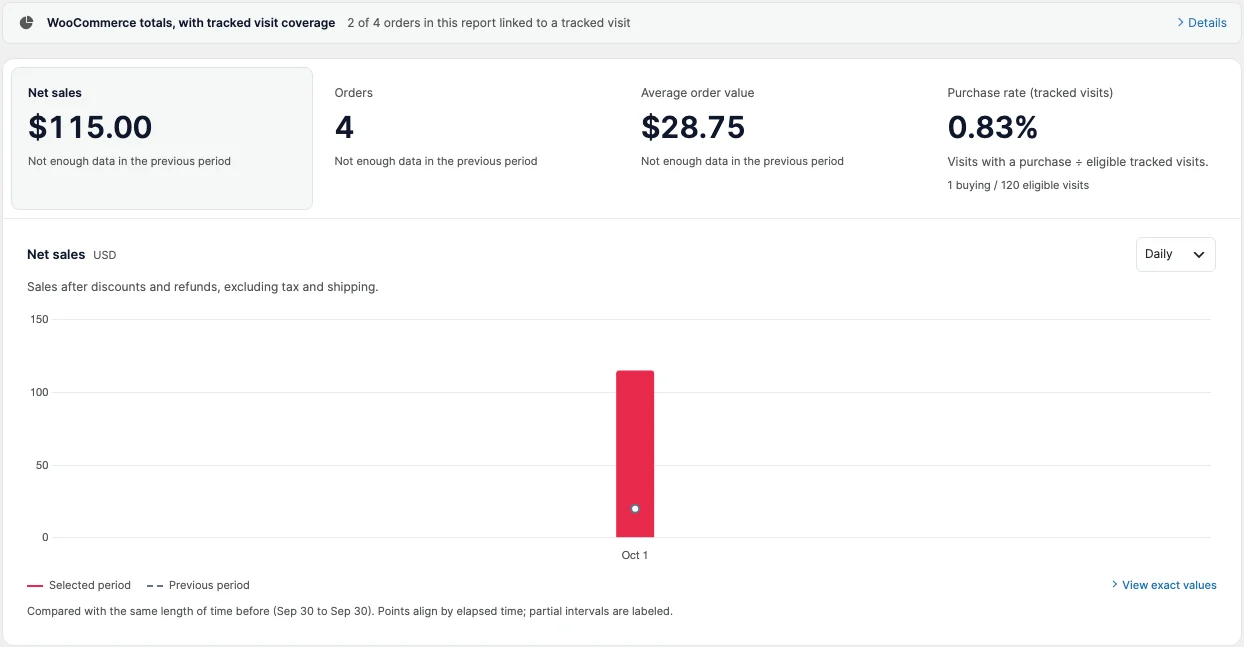
- Coverage first. Before any split, the report says how many orders it could link to a tracked visit.
- Net sales. After discounts and refunds, before tax and shipping. Fees stay in. A later refund updates the period the order was placed in.
- Purchase rate (tracked visits). Visits with a purchase divided by eligible tracked visits, with both counts printed. Small samples are shown as measured.
- Compared fairly. Daily, weekly or monthly, against the same length of time just before. Each currency is reported on its own, never converted.
It tells you what it doesn't know
Store reports go wrong when they fill gaps with guesses. SlimStat leaves the gaps visible, so you can decide what to trust before you change a price or a campaign.
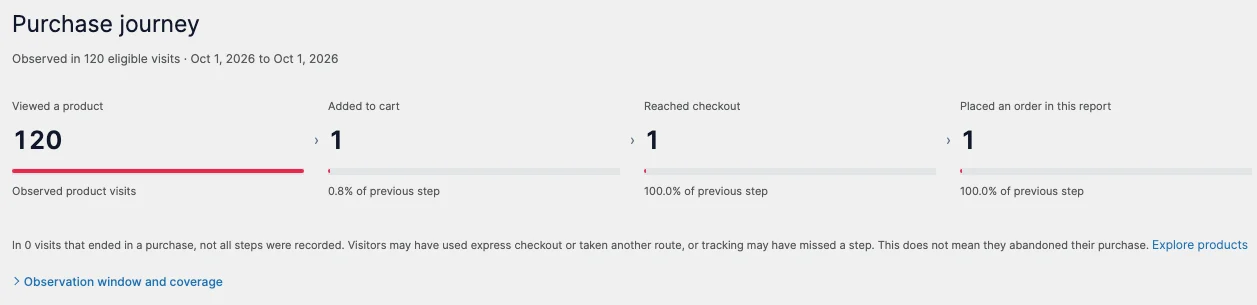
A purchase journey, not an invented funnel
The journey counts the visits it actually observed at each step: viewed a product, added to cart, reached checkout, placed an order. Express checkout can skip a step, so a missing step is reported as a missing observation, never as an abandoned cart.
Where to look next, with the reason
Your next investigation lists up to three things worth checking, most important first: orders without a tracked visit, refunds, and the biggest drop in the journey. Each one says what it is based on and treats friction as a hypothesis to test, not a measured cause.

Server-side order tracking: every order counts
SlimStat reads orders and refunds from WooCommerce on your server, not from a tag in the buyer's browser, so an ad blocker or a thank-you page that never loads cannot drop an order from your totals. Read more about server-side tracking. An order is linked to a visit only when the buyer's browser already carried SlimStat's tracking cookie and their consent choices allow it. There is no matching by IP address or email and no guessing across devices. Orders without a link still count in your totals. If WooCommerce recorded where an order came from with its own order attribution, SlimStat uses that channel; otherwise the order appears as Unassigned.
WooCommerce analytics in Free and Pro
Free gives a store owner a complete report. Pro adds the detail agencies and marketers ask for.
| Store report | Free 6 | Pro 3 |
|---|---|---|
| Net sales, orders, average order value, purchase rate | Yes | Yes |
| Net sales chart compared with the previous period | Yes | Yes |
| Sales by channel and source | Yes | Yes |
| Products ranked by net sales after refunds | Yes | Yes |
| Purchase journey and next investigation | Yes | Yes |
| Import of past orders | Yes | Yes |
| Sales by UTM campaign and landing page | No | Yes |
| Mobile and desktop, guest and registered account | No | Yes |
| Coupon and refund detail | No | Yes |
| "View sales in Ecommerce" from channel and campaign reports | No | Yes |
| CSV downloads, up to 1,000 rows | No | Yes |
| Scheduled Ecommerce email summaries | No | Yes |
Pro is $39 a year for one site and includes every Pro feature, heatmaps and funnels too. Compare Pro plans.
Reporting to a client or a team
- Scheduled summaries Pro
- Add the Ecommerce summary to a daily, weekly or monthly email report. Store totals are never sent in emails that authors receive about their own content.
- Spreadsheet downloads Pro
- Download a ranked report with the same dates, currency and filters. Files hold no customer details, and spreadsheet formulas are neutralized.
- From visits to sales Pro
- With Ecommerce set up, each row in the channel and UTM campaign reports links to View sales in Ecommerce, so a campaign's visits and its orders are one click apart.
- Who can see revenue
- Store figures need SlimStat access plus WooCommerce report permission. Only shop managers and administrators can run setup.
Store data stays in your WordPress database
- Setup adds one SlimStat table and an index. No WooCommerce table is changed.
- The reports add no names, email addresses, postal addresses, IP addresses or new browser identifiers.
- Orders link to visits only when consent and your exclusion rules allow it.
- When WooCommerce erases an order's personal data, SlimStat removes that order's visit link, channel, source and campaign.
- WordPress's personal data export includes the store links SlimStat holds, listed as SlimStat Ecommerce associations.
Your obligations depend on your setup and where you trade; this is not legal advice. The installation guide covers consent and exclusions.
Set up WooCommerce analytics in three steps
-
Check the basics
WooCommerce 8.3 or newer with its background scheduler, 64-bit PHP and SlimStat 6. Your host can confirm these in a minute.
-
Open SlimStat › Ecommerce
Choose Set up Ecommerce. It creates SlimStat's store table and starts reading your orders.
-
Let past orders import
Orders import in the background, 50 at a time. Totals are marked provisional until the import finishes; new orders follow as they arrive.
Read the full setup guide, including how to rebuild the reports later.
WooCommerce analytics questions
Short answers for store owners, checked against the plugin code.
Answers cover Free 6.0.0 and Pro 3.0.0. These are preview versions; check the available downloads in the release notes.
Does WooCommerce reporting require Pro?
No. After setup, Free 6 shows WooCommerce sales, orders, average order value, popular products and traffic sources. It also shows recorded steps toward a purchase and explains which orders could be connected to tracked visits.
Pro 3 adds sales by campaign, landing page and device; comparisons of guests and account holders; coupons and refund details; spreadsheet downloads; and scheduled emails.
You need WooCommerce 8.3 or newer, its background scheduler, 64-bit PHP and permission to view the store reports. Your host can help check these requirements. Set up Ecommerce.
Does SlimStat replace WooCommerce Analytics?
No. WooCommerce stays the record of your orders, so keep using it for accounting, tax and stock. SlimStat reads those orders and, where consent allows, links each one to the tracked visit that came before it. That is how it can show sales by channel, source and product next to your traffic reports, and by campaign, landing page, device, customer type and coupon with Pro.
SlimStat never changes a WooCommerce table. See what the store reports show.
Will my past WooCommerce orders appear in the reports?
Yes, as far back as your SlimStat data retention setting keeps records. Setup imports existing orders in the background, 50 at a time, and figures are marked provisional until the import finishes.
Past orders are not linked to SlimStat visits after the fact; that link is made only at checkout. If WooCommerce recorded an order’s origin with its own order attribution, SlimStat uses that channel, source and campaign. Otherwise the order counts in your sales and product totals and appears as Unassigned in channel reports. Landing page and device need a linked visit.
Why do some WooCommerce orders show as Unassigned?
SlimStat links an order to a visit when the buyer’s browser already carried SlimStat’s tracking cookie, the visit was recorded as a human pageview, and consent and your exclusion rules allow it. It does not match orders by IP address or email, and it does not guess across devices. Consent choices, ad blockers and buyers who switch devices are common reasons an order has no linked visit.
Without a linked visit, SlimStat uses the origin WooCommerce recorded with its own order attribution, if there is one. An order with neither still counts in net sales and order totals and shows as Unassigned in channel and source reports. The line at the top of the report says how many orders were linked to a tracked visit.
How does SlimStat report a store that sells in several currencies?
Each currency is reported on its own. You choose the currency, and net sales, orders and averages cover orders in that currency only. SlimStat never converts between currencies or adds them together.
Visit counts have no currency, so the purchase rate compares buying visits in the chosen currency with all eligible tracked visits. The report says so beside the figure.
What store data does SlimStat keep, and where?
Setup adds one SlimStat table to your WordPress database, plus an index for faster reports. It holds order summaries, product lines and coupons, with a link to the tracked visit where one exists. No WooCommerce table is changed.
The store reports add no names, email addresses, postal addresses, IP addresses or new browser identifiers. When WooCommerce erases an order’s personal data, SlimStat removes that order’s visit link, channel, source and campaign. WordPress’s personal data export lists the links SlimStat holds as SlimStat Ecommerce associations.
Whether a setup meets your obligations depends on your site and where you trade; this is not legal advice.
Know which marketing brought the order
Start with the free reports on your own store, or go straight to campaigns, devices and coupons with Pro. Either way the data stays in your WordPress database.
70,000+ active installs, rated 4.8 out of 5 in 816 reviews on wordpress.org.