
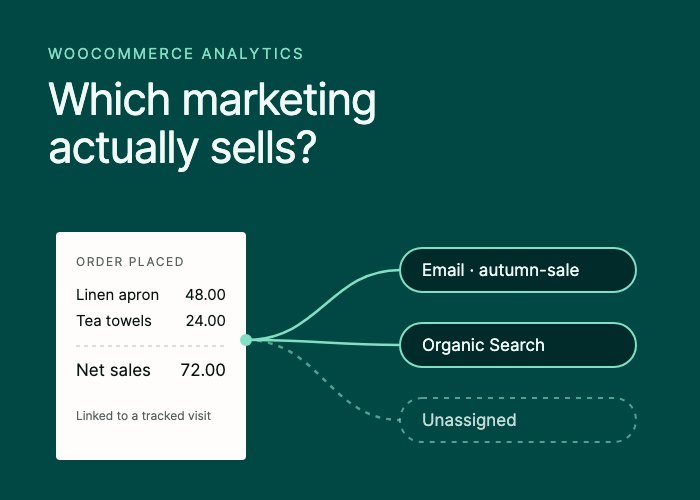
You sent a newsletter on Monday, boosted a post on Tuesday and a new product page started ranking on Wednesday. By Friday the store had twelve orders. Which of those three things sold anything?
That is the question sales attribution answers. Most WooCommerce stores answer it by guesswork, because the order and the visit that led to it are stored in two different places.
What sales attribution means for a WooCommerce store
A WooCommerce order records what was bought, for how much and by whom. On its own, it does not record how the buyer found you. A visit in your analytics records where someone came from and what they looked at, but not whether they paid.
Attribution is the rule that joins the two and decides which marketing gets the credit. Every “revenue by channel” report applies a rule, whether it says so or not. The two you will meet most often:
| Rule | Credits the order to | Useful for |
|---|---|---|
| The visit that placed the order | How the buyer arrived on the visit in which they checked out | Seeing what closes sales |
| First touch | How the buyer first arrived, possibly weeks earlier | Seeing what introduces new buyers |
First touch needs a way to recognize the same person across visits and devices, which usually means more identifiers and a longer memory of each visitor. Neither rule measures what would have happened without the marketing. Both assign credit; neither proves cause.
Where the credit for an order can come from
There are three honest sources of attribution for a WooCommerce order.
Your analytics links the order to a tracked visit. At checkout, the analytics tool recognizes the visit the buyer is in and records the link. This is the richest source: it knows the channel, the UTM campaign, the page the visit started on and the device.
WooCommerce’s own order attribution. Recent WooCommerce versions save a small attribution record on each order: whether the buyer arrived from a UTM-tagged link, organic search or a referral, or typed the address, plus the UTM fields when there were any. It needs no separate analytics tool, but it knows nothing about the visit beyond what it stored.
Nothing. The buyer declined consent, blocked tracking, switched devices or arrived in a way nobody recorded. The honest label for that order is “unknown”. A report that spreads unknown orders across channels in proportion to the known ones is guessing, and the guess flatters whichever channel is already largest.
How SlimStat attributes WooCommerce orders
SlimStat Free 6 reads every order and refund from WooCommerce on your server, so an ad blocker or a thank-you page that never loads cannot drop an order from your totals. Only the credit depends on the browser. SlimStat uses the three sources in that order:
- When the buyer’s browser already carries SlimStat’s tracking cookie and their consent choices allow it, the order is linked to the visit it was placed in. It takes that visit’s channel, source and UTM campaign, and the page the visit started on.
- If no visit is linked, SlimStat uses the attribution WooCommerce recorded on the order, if there is one.
- Otherwise the order appears as Unassigned. It still counts in your totals.
There is no matching by IP address or email address and no guessing across devices. Before any breakdown, the report says how many orders in the period it could link to a tracked visit. If 40 of 100 orders are linked, you know the channel split rests on those 40 plus whatever WooCommerce recorded, and you read it that way.
One consequence is worth knowing before you look at the numbers. Credit goes to the visit in which the order was placed. A buyer who clicked your newsletter on Monday and came back on Thursday by typing your address is credited to Direct / unknown, not Email. The email still did its job. That is the limit of crediting a single visit, and the reason to compare channels side by side rather than crown one.
Reading a sales-by-channel report
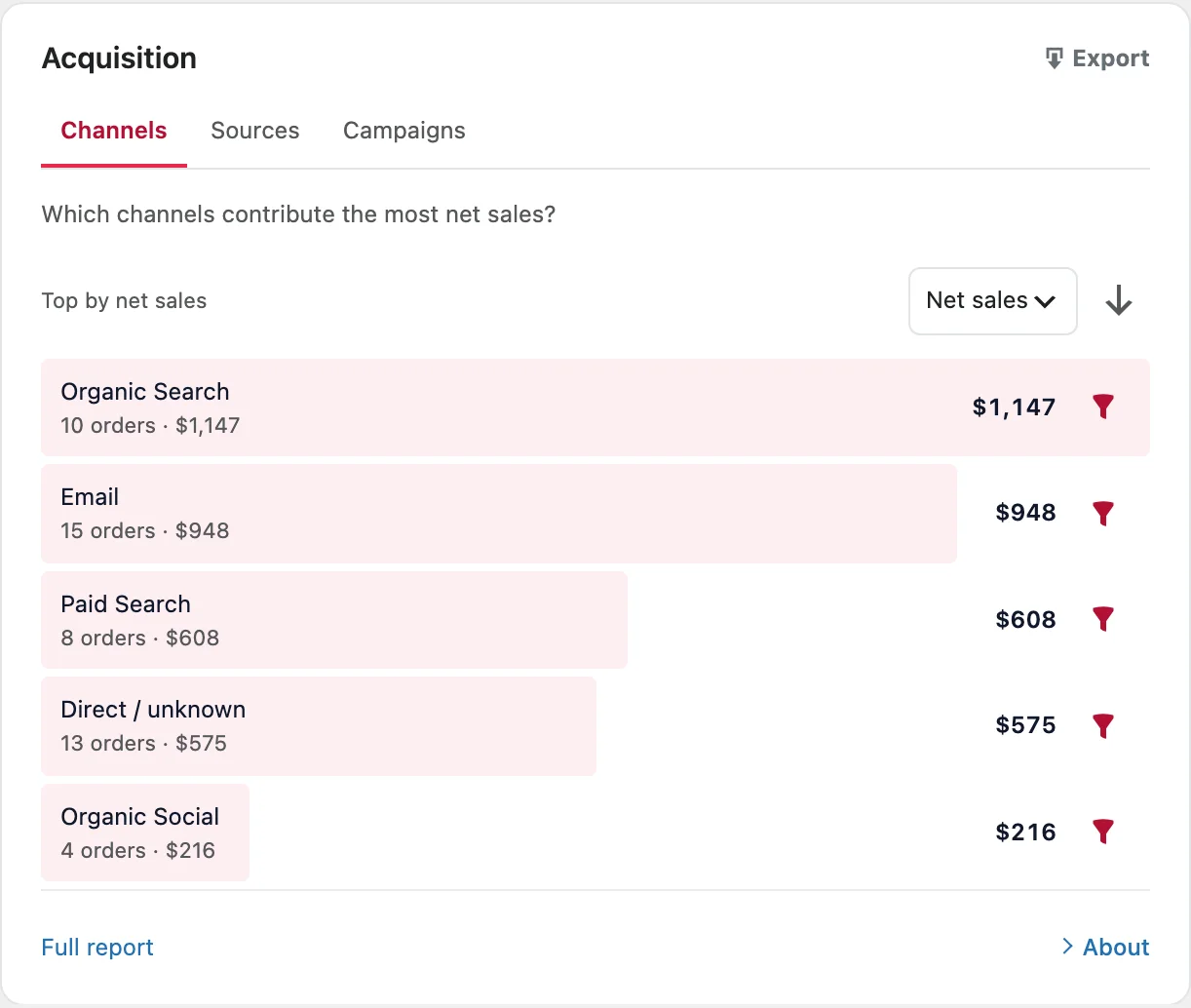
SlimStat Pro 3 shown. Demo store, test orders.
Free 6 ranks channels and their sources by net sales and orders. A few habits keep the ranking honest.
Start with coverage. Check how many orders were linked to a tracked visit before you compare channels. A drop in coverage after a consent banner change is a tracking story, not a marketing one.
Compare net sales, not order totals. SlimStat’s net sales are order totals after discounts and refunds, before tax and shipping. A channel whose orders keep coming back as refunds drops to where it belongs.
Read orders and net sales together. In the demo store above, Organic Search brought 10 orders worth $1,147 and Email brought 15 worth $948. Email sells more often; search sells larger baskets. Those call for different next steps.
Keep currencies apart. SlimStat reports one currency at a time and never converts, so a strong euro week cannot hide inside a dollar total.
Contribution is not efficiency. A channel’s net sales tell you what it contributed, not whether it was worth what it cost. SlimStat does not know your ad spend, so it does not calculate return on ad spend. Put the cost next to the channel’s net sales yourself before you cut or scale anything.
WooCommerce UTM tracking: make campaigns attributable before you send them
Every visit has a channel. A campaign exists in your reports only if the link carried UTM parameters.
- Tag every link you control that brings people in: newsletters, social posts, paid ads, partner links.
utm_sourcenames where the link appears,utm_mediumthe kind of link andutm_campaignthe promotion. - Choose a naming scheme and keep it.
autumn-sale,Autumn_Saleandautumn sale 2026will read as three campaigns. - Keep UTM parameters off links between your own pages. They describe how someone arrived, and an internal link is not an arrival.
SlimStat Free includes a UTM link builder; the UTM campaign guide covers it. Pro 3 then ranks every campaign by net sales and orders, and splits the same figures by landing page, device, guest or registered account and coupon.
A five-minute weekly check
- Open SlimStat › Ecommerce, choose the last 7 days and your main currency.
- Read the coverage line and note the share of linked orders.
- Compare channels by net sales and by orders.
- Open the leading channel to see which sources it is made of.
- With Pro, open the Campaign report and compare this week’s tagged links.
- Write down one question to test next week, not a conclusion.
What attribution cannot tell you
- Whether the sale would have happened anyway. Only a controlled test answers that, for example holding a newsletter back from part of your list and comparing the two groups.
- Journeys that cross devices or browsers. A buyer who researches on a phone and pays on a laptop looks like two people, unless something links them, and SlimStat deliberately does not.
- Profit. Net sales leave out tax and shipping, but SlimStat does not know what your products or your advertising cost.
Attribution done this way gives a smaller answer than some dashboards promise, but you can act on it. You know which orders it covers, which rule it used and what it left out.
See what SlimStat’s WooCommerce analytics show, or follow the setup guide to connect your store.