
You boosted a post on Facebook, ran a Google ad and sent a newsletter in the same week. Traffic went up. Which one did it?
Without tags, you cannot tell. A click from a Facebook ad and a click from a friend’s Facebook share look the same to your site. Many email apps send no referrer at all, so those visits land in Direct / unknown.
This guide covers which UTM tags to put on each kind of campaign link, how to build those links inside WordPress, and how to read the answer in SlimStat. It is for site owners who run their own ads and newsletters and want a plain answer, not an attribution model.
Which tags to use, at a glance
Put these three tags on every link that you pay for or send out. The last column shows where the visit appears in SlimStat’s Channels report.
| Campaign | utm_source | utm_medium | utm_campaign | Shows in Channels as |
|---|---|---|---|---|
| Google search ads | google | cpc | autumn-sale | Paid Search |
| Microsoft (Bing) ads | bing | cpc | autumn-sale | Paid Search |
| Facebook or Instagram ads | facebook or instagram | paid_social | fall-favourites | Paid Social |
| Email newsletter | newsletter | email | autumn-sale | |
| Display or banner ads | the ad network’s name | display | autumn-sale | Display |
| Influencer, paid per post | the platform: instagram, tiktok | paid_social | fall-favourites | Paid Social |
| Influencer or affiliate, paid per sale | the creator or network | affiliate | fall-favourites | Affiliates |
utm_campaign names the offer, not the channel, so one campaign can run across several sources. For influencers, put the creator’s name in utm_content. That keeps each creator’s visits separate inside one campaign.
Why untagged ads disappear
SlimStat sorts every pageview into a channel. Tags come first: when a link carries utm_medium, SlimStat uses it. Without tags, it falls back to the referring site, and the referrer cannot tell a paid click from a free one.
- Social ads arrive from the same domains as ordinary shares, so they count as Organic Social.
- Email often arrives with no referrer at all, so it counts as Direct / unknown.
- Google Ads auto-tagging adds a
gclidclick ID but no medium. SlimStat records agclid-only visit as Paid Other. Addutm_source=google&utm_medium=cpcto the ad’s final URL suffix and it shows as Paid Search.
SlimStat’s own help text puts it plainly: Direct / unknown “can include untagged email, private messages or apps.”
What you need
- SlimStat 6 or later. The link builder, Channels and UTM Campaigns are all in the free plugin.
- On a site upgraded from an older version, run SlimStat → Migration → Enable UTM and channel reports once. Older pageviews stay Unassigned; SlimStat does not rebuild old tags. The UTM campaign guide covers the migration.
- Visits are recorded only when your consent and exclusion settings allow them. Test in a private window, because your own visits may be excluded.
Agree on names before you start
Tags keep their case: Email and email become two rows. Write the rules down once and reuse them for every link.
utm_source   = where the link is placed:    google, facebook, newsletter
utm_medium   = the kind of traffic:         cpc, paid_social, email, display, affiliate
utm_campaign = the offer or push:           autumn-sale, fall-favourites
utm_content  = which ad, button or creator: carousel-a, footer-link, creator-maya
utm_term     = the paid keyword, if any:    flower-delivery

Lowercase only. Hyphens, not spaces. No names, emails or order numbers.
Tag links that bring people in from outside: ads, emails, social posts, QR codes. Never tag links between your own pages. A tagged internal link replaces the real source with your own campaign.
Four questions, step by step
The screenshots come from a demo flower shop with made-up traffic. They show SlimStat Pro, which lists every channel. Free shows the top two; the difference is in the table after step 4.
1. How do I build a tagged link without typos?
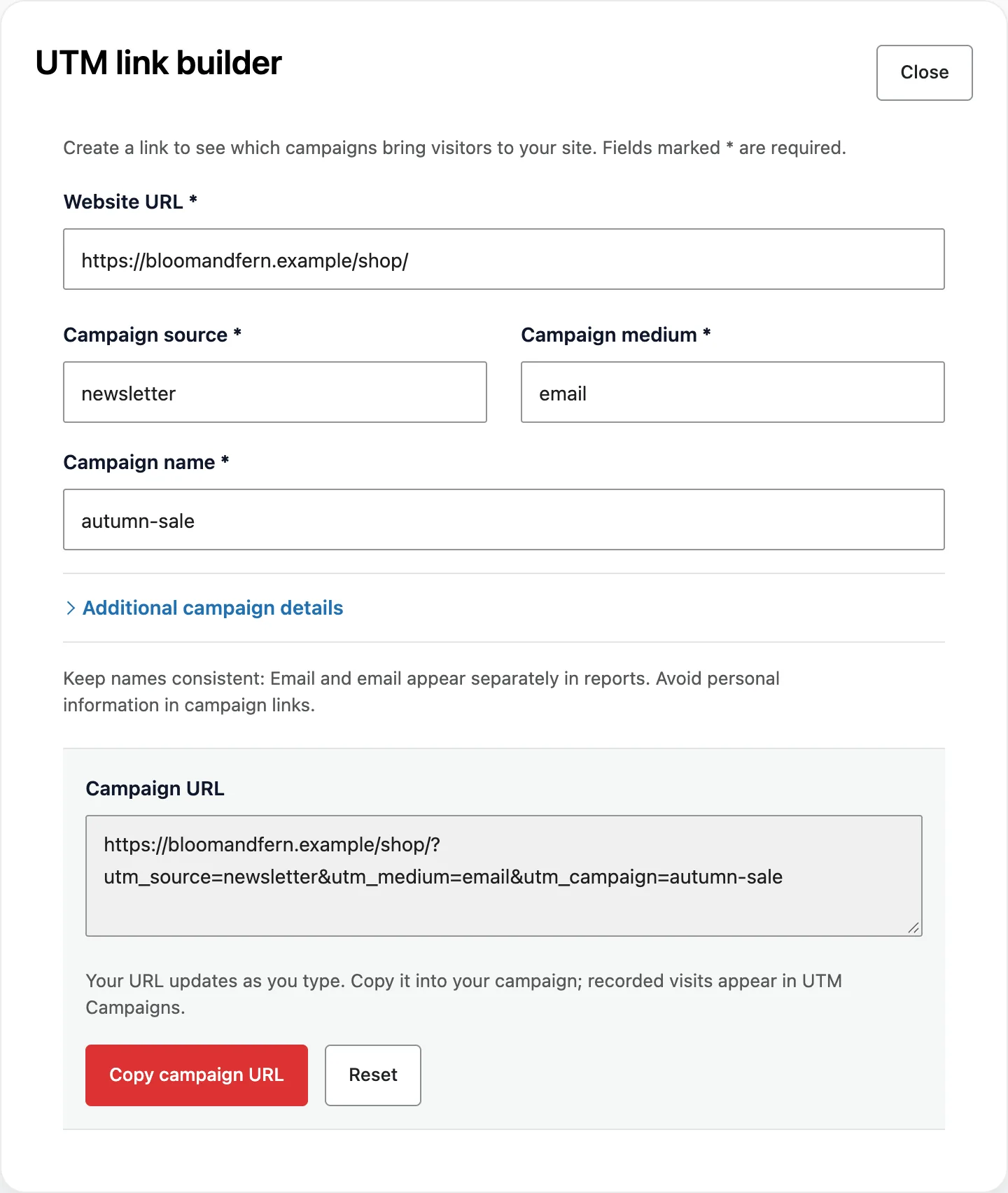
Open SlimStat → Traffic Sources and select Build campaign link on the Channels or UTM Campaigns card. The UTM link builder opens.
- Paste the page people should land on into Website URL.
- Fill in Campaign source, Campaign medium and Campaign name.
- Open Additional campaign details to add Campaign content or Campaign term.
- Select Copy campaign URL and paste the result into your ad, email or post.
Demo store, made-up data.
What it showed: the builder turned the three fields into https://bloomandfern.example/shop/?utm_source=newsletter&utm_medium=email&utm_campaign=autumn-sale. It keeps any parameters already on the URL. It does not shorten links.
What to test: open the copied link once in a private window, then check that the campaign shows up in UTM Campaigns for today.
2. Which kind of campaign brought the most visitors?
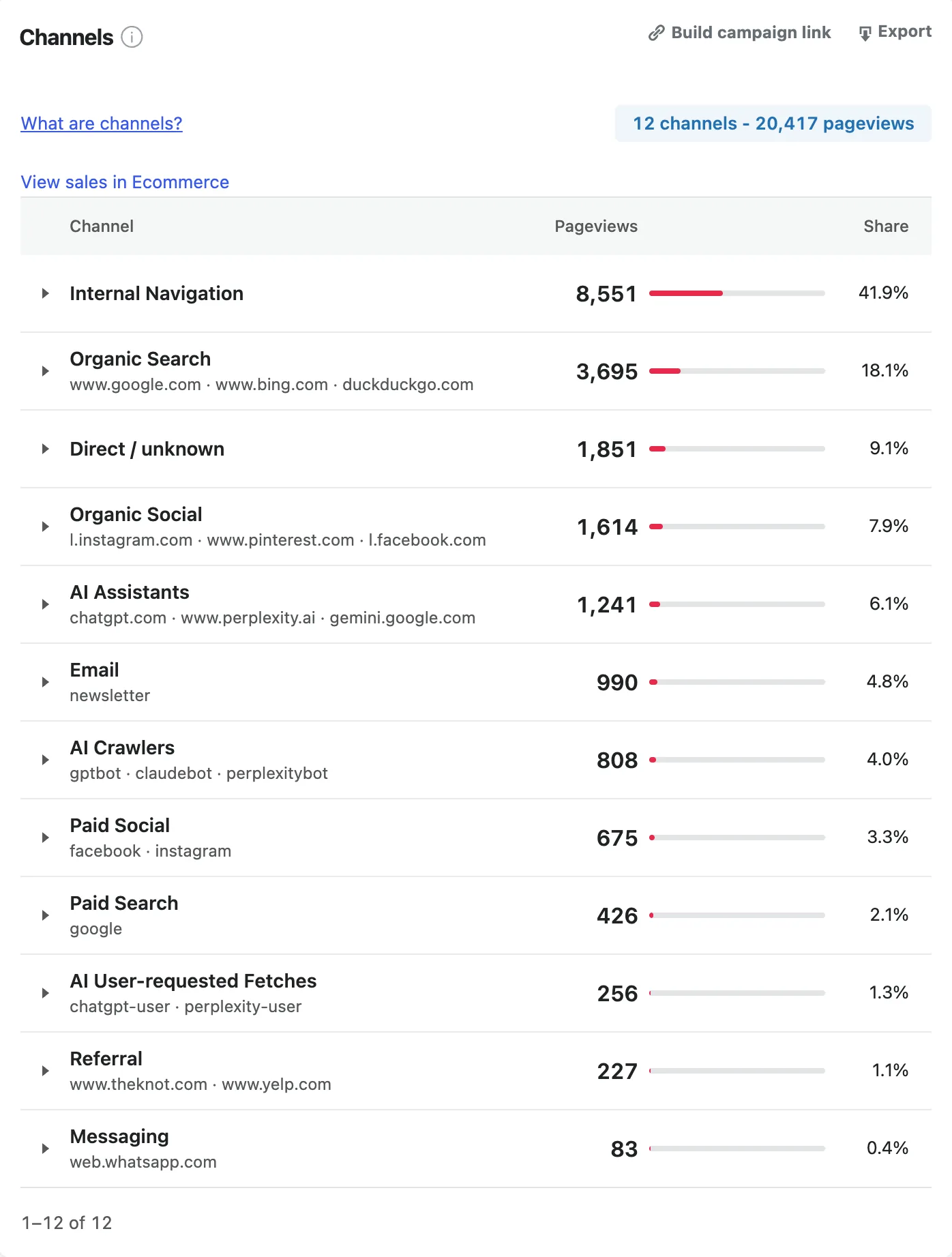
The Channels card on Traffic Sources groups every pageview by channel. Paid, email and display campaigns only get their own rows when their links are tagged.
Demo store, made-up data. SlimStat Pro 3 shown.
What it showed: Email brought 990 pageviews (4.8%), Paid Social 675 (3.3%) and Paid Search 426 (2.1%). Organic Social brought 1,614. Without paid_social tags, the ad clicks would have been counted inside that Organic Social row.
What to test: if a channel you pay for is missing or smaller than the ad platform’s click count, open one live ad and check its link. A missing or misspelled utm_medium is the usual cause.
3. Which campaign, and which ad inside it?
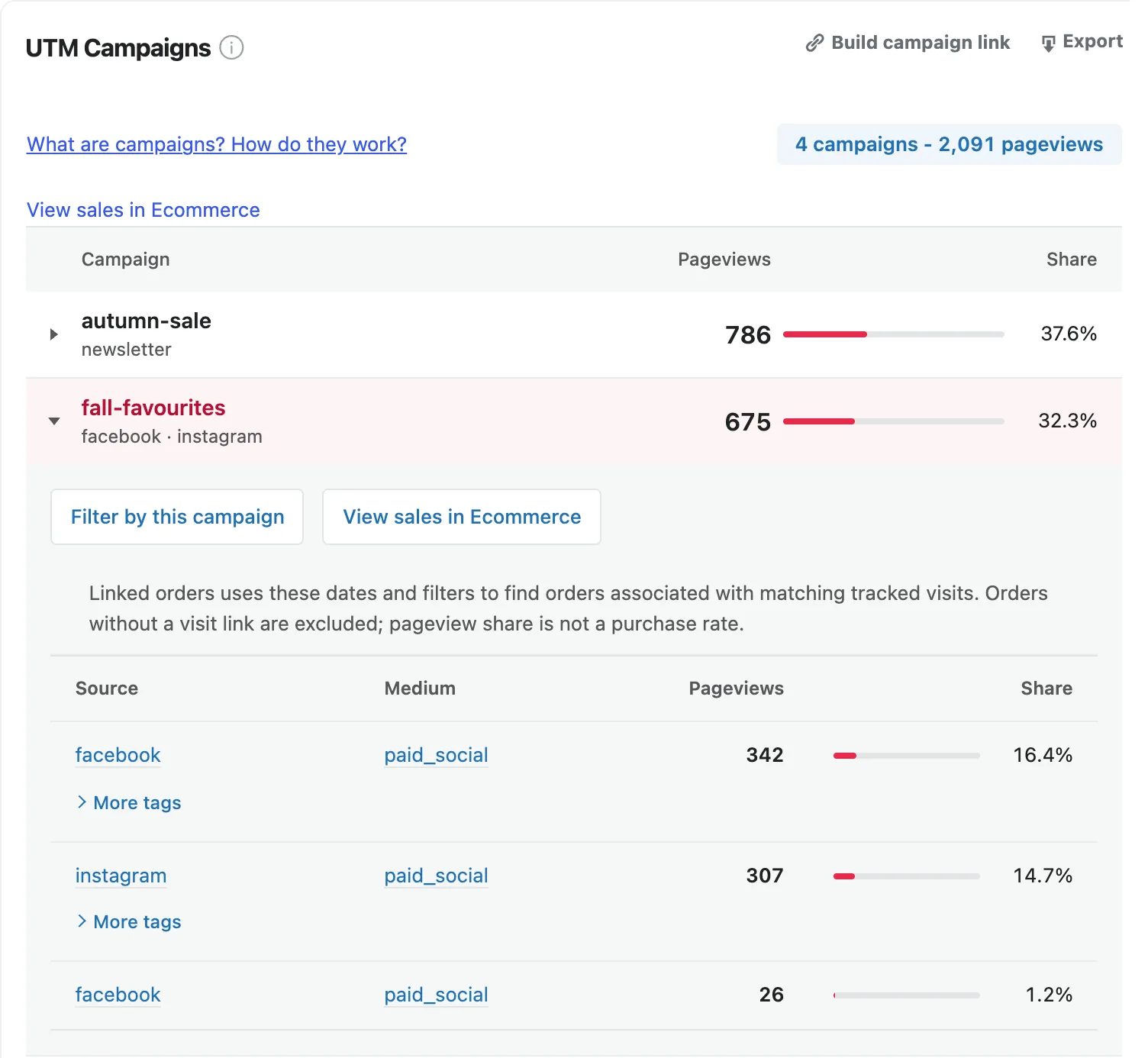
The UTM Campaigns card lists campaigns by utm_campaign. Expand one to see each source and medium behind it, and select More tags to see the content and term.
Demo store, made-up data. SlimStat Pro 3 shown.
What it showed: the newsletter campaign autumn-sale brought 786 pageviews. The paid social campaign fall-favourites brought 675: 342 from Facebook and 307 from Instagram. The second Facebook row of 26 is a different tag combination; More tags shows which content or term it carried.
What to test: give each creative its own utm_content (carousel-a, video-b). After a week, keep the one that brings more visitors to the page you care about.
4. Did the campaign lead to an inquiry or a sale?
Expand a campaign and select Filter by this campaign, then open SlimStat → Goals & Funnels from the menu. The filter comes with you, so Goals and its CR column count only pageviews carrying that campaign tag.
There is a limit. SlimStat assigns a campaign to the pageview that carried the tag, not to the whole visit. A goal reached on a later page, such as a thank-you page, is not counted under the campaign filter. A goal on the landing page itself, such as a form submission there, is counted. See tracking your first inquiry to set one up.
For WooCommerce stores, SlimStat Pro adds View sales in Ecommerce to the expanded campaign. It opens the Ecommerce reports with the same dates and filters and shows orders linked to the matching tracked visits. Orders without a visit link are left out. WooCommerce sales attribution explains how an order gets that credit.
What to test: put the inquiry form on the page your ad points to, not one click away. The campaign filter can then count the submission.
Free versus Pro
The link builder, both reports and the filters are free. Pro adds the rows Free summarises and the link to store sales.
| Feature | Free | Pro |
|---|---|---|
| UTM link builder | Yes | Yes |
| Channels and UTM Campaigns | The top two channels or campaigns, plus a count of the rest | Every channel and campaign |
| Sources inside a channel or campaign | No | Yes |
| Filter by this channel / Filter by this campaign | Yes, for the rows shown | Yes |
| Goals | One active goal | Five goals and three funnels |
| View sales in Ecommerce | No | Yes, with WooCommerce |
Turning answers into action
Change one thing per campaign, then wait long enough for real numbers. A week with 30 tagged pageviews says little; a month with 300 says more.
- Compare the same campaign over two equal date ranges, before and after the change.
- Keep the landing page the same while you test the ad, and the ad the same while you test the page.
- Retire tags you no longer use instead of reusing old names for new offers. A reused name mixes two campaigns into one row.
What this cannot tell you
- Ad spend and return on ad spend. SlimStat does not import costs from ad platforms. Divide your spend by the visits or orders yourself.
- View-through conversions. Someone who saw the ad, did not click, and came back later through Google shows as Organic Search.
- Later visits. The campaign belongs to the tagged pageview. If the same person returns the next day by typing your address, that visit is Direct / unknown.
- Untagged clicks. Any link you did not tag falls back to its referrer, or to Direct / unknown.
- Visitors who are not recorded. Declined consent, your exclusion rules and blocked scripts all reduce the count. Expect SlimStat to show fewer visits than the ad platform shows clicks.
Frequently asked questions
Do I need SlimStat Pro to track UTM campaigns?
No. The link builder, the Channels and UTM Campaigns reports and the campaign filters are free. Free shows the top two rows in each report; Pro shows all of them and the sources behind each.
Why does my Google Ads traffic show as Paid Other?
Google’s auto-tagging adds a gclid click ID but no utm_medium. Add utm_source=google&utm_medium=cpc to the ad’s final URL suffix, and new clicks will show as Paid Search.
Should I tag links between my own pages?
No. A tag on an internal link replaces the visitor’s real source with your campaign. Tag only links that bring people in from outside your site.
Does the case of a tag matter?
Yes. Email and email appear as separate rows. Use lowercase for every tag.
What goes in utm_content and utm_term?
utm_content tells apart ads, buttons or creators within one campaign. utm_term holds the paid search keyword. Both are optional and appear under More tags.
Can SlimStat show which campaign led to a WooCommerce order?
With SlimStat Pro and WooCommerce, View sales in Ecommerce shows the orders linked to visits from that campaign. Orders without a linked visit are left out.
Why don’t I see my test visit?
Check that the date range includes today, and that your own visits are not excluded. On an upgraded site, also check that Enable UTM and channel reports has run on the Migration screen.