
People now ask ChatGPT or Perplexity where to buy flowers, which plugin to use or who fixes boilers nearby. Sometimes the answer links to your site and someone clicks. Your analytics should show that click as its own line, not mix it into “referrals”.
SlimStat sorts this traffic into three channels: AI Assistants, AI User-requested Fetches and AI Crawlers. This guide explains what each one records, how to read them in WordPress, and what they cannot tell you. It is for site owners who want to know whether AI answers send them visitors, without setting up anything technical.
The three AI channels at a glance
| Channel | What it records | Examples | What to do with it |
|---|---|---|---|
| AI Assistants | A person who clicked a link in an AI answer, or followed a link you tagged for an assistant | chatgpt.com, www.perplexity.ai, gemini.google.com, copilot.microsoft.com, claude.ai | Check which pages they land on and keep those pages accurate |
| AI User-requested Fetches | An assistant opening one of your pages because a user asked it to, at that moment | chatgpt-user, perplexity-user | Shows your pages are being read for answers; no person visited |
| AI Crawlers | A bot collecting pages for AI training or AI search | gptbot, claudebot, perplexitybot | Decide in robots.txt which ones you allow |
Only the first row counts people. The other two count automated requests, and SlimStat does not record them unless you change two settings (item 5).
Why AI visits get lost in most reports
Most analytics tools file a click from chatgpt.com under “Referral”, next to blogs and directories. A visit from an AI app that sends no referrer at all lands in Direct. Either way, AI traffic is hard to see.
SlimStat checks each pageview’s tags, referrer and user agent against a list of known assistants and AI bots. Its help text says what that means in practice: “AI Assistants identifies referrals or tagged links from known assistants. AI Crawlers and AI User-requested Fetches identify automated requests by their claimed user agent, not verified identity.”
What you need
- SlimStat 6 or later. The Channels report is in the free plugin, on SlimStat → Traffic Sources.
- On a site upgraded from an older version, run SlimStat → Migration → Enable UTM and channel reports once. Older pageviews stay Unassigned. The UTM campaign guide explains the migration.
- Nothing to add to your pages. AI assistant visits are recognised from the referrer and tags SlimStat already records.
Five questions, step by step
The screenshots come from a demo flower shop with made-up traffic. They show SlimStat Pro, which lists every channel and the sites behind each. Free shows the top two channels; item 2 has a way around that.
1. How many visitors do AI assistants send me?
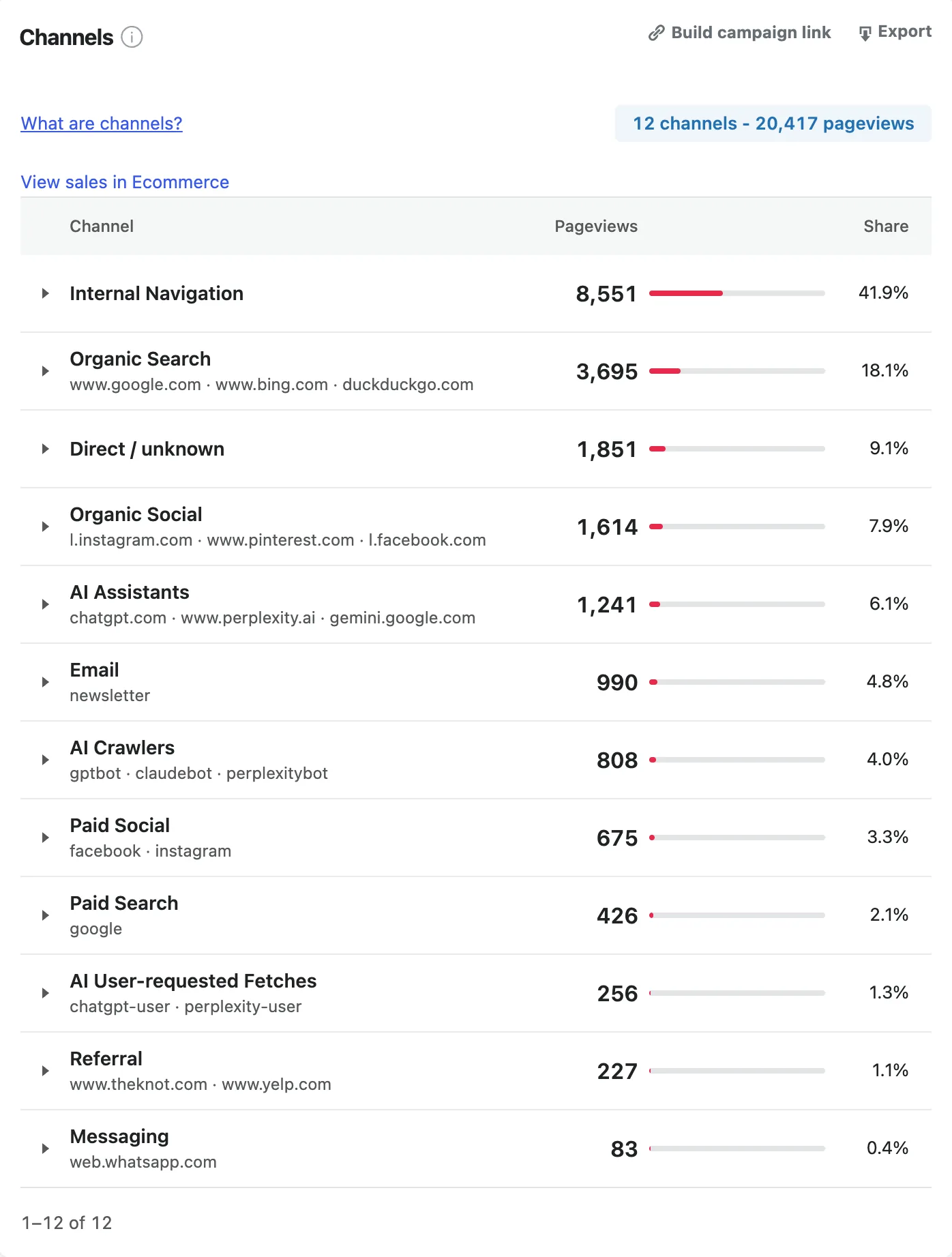
Open SlimStat → Traffic Sources and find the Channels card. It counts pageviews by channel for the date range you pick.
Demo store, made-up data. SlimStat Pro 3 shown.
What it showed: AI Assistants brought 1,241 pageviews, 6.1% of the total. That is more than Email (990) and about a third of Organic Search (3,695). AI Crawlers (808) and AI User-requested Fetches (256) appear because this demo site collects bots; most sites do not by default.
What to test: compare this month with last month. If AI Assistants is growing while Organic Search stays flat, the pages AI answers link to are worth your attention first.
2. Which assistant sends the most?
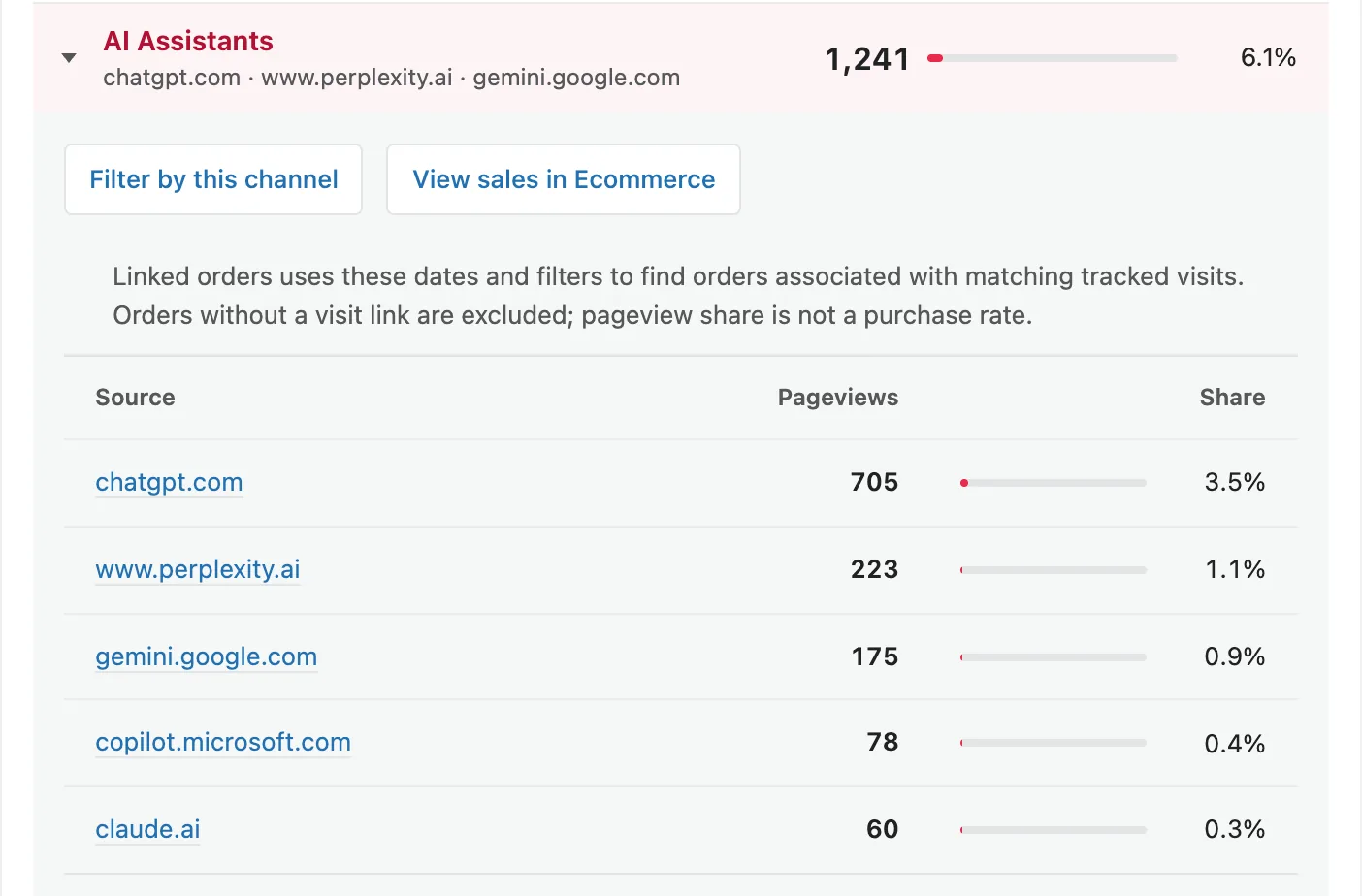
In Pro, expand AI Assistants to see each assistant’s site with its own count.
Demo store, made-up data. SlimStat Pro 3 shown.
What it showed: chatgpt.com sent 705 pageviews, more than the other four assistants together. www.perplexity.ai sent 223, gemini.google.com 175, copilot.microsoft.com 78 and claude.ai 60.
In Free, use Top Referring Domains on the same screen. It lists referring sites, including chatgpt.com and perplexity.ai when they send visits. That count covers referrers only, so it can differ a little from the AI Assistants row.
What to test: ask the leading assistant the questions your customers ask. Check whether its answer links to you, and to which page.
3. Which pages do AI visitors land on?
Expand AI Assistants and select Filter by this channel. Then open SlimStat → Overview from the menu; the filter comes with you. Top Web Pages now lists only the pages that AI answers sent people to.
In Free, the filter button appears only when AI Assistants is one of the top two channels. Otherwise, select chatgpt.com in Top Referring Domains to filter by that assistant instead.
SlimStat assigns a channel to each pageview, not to the whole visit. The filtered pages are the pages people arrived on from the assistant. Pages they clicked to next count as Internal Navigation.
What to test: open the top landing page and read it as a stranger would. Are prices, opening hours and contact details current? AI answers repeat what your page says, including old information.
4. Do AI visitors become leads or customers?
With the AI Assistants filter still on, open SlimStat → Goals & Funnels. Goals and its CR column now count only pageviews from AI assistants.
The per-pageview rule limits this. A goal reached on a later page, such as a thank-you page, is not counted under the AI filter. A goal on the landing page itself, such as a form submission there, is counted. Tracking your first inquiry shows how to set one up.
For WooCommerce stores, SlimStat Pro adds View sales in Ecommerce to the expanded channel. It shows orders linked to the matching tracked visits. Orders without a visit link are left out. WooCommerce sales attribution explains how an order gets that credit.
What to test: add one clear next step, such as a contact form or “Book now” button, to the page AI visitors land on most. Compare the goal count for four weeks before and after.
5. Are AI bots reading my site?
AI crawlers and fetchers are recorded only when two settings allow it, and neither does by default:
- SlimStat → Settings → Exclusions → Bots is on by default and discards automated visits. Turn it off to record them.
- SlimStat → Settings → General → Tracking mode is Client by default. Bots rarely run JavaScript, so Client mode misses them. Server mode records requests that reach WordPress.
There are trade-offs. With Bots off, every other bot is recorded too, under Other Bots, and adds to your pageview counts. Server mode cannot see pages your caching plugin serves, for people or bots. On a cached site, keep Client mode and accept that crawler counts will be low.
What it showed: in the demo, AI Crawlers made 808 requests (gptbot, claudebot, perplexitybot) and AI User-requested Fetches made 256 (chatgpt-user, perplexity-user).
What to test: collect bots for one week, note which AI crawlers visit, then decide in robots.txt which to allow. Turn Bots back on afterwards if you do not want them in your totals.
Free versus Pro
| Feature | Free | Pro |
|---|---|---|
| Three AI channels in Channels | Shown when among the top two channels; the rest are counted | Every channel |
| Assistant sites inside AI Assistants | No; use Top Referring Domains | Yes |
| Filter by this channel | Yes, for the channels shown | Yes |
| Goals | One active goal | Five goals and three funnels |
| View sales in Ecommerce | No | Yes, with WooCommerce |
Turning answers into action
AI answers draw on pages that state facts clearly. Work on the pages AI visitors already land on before writing new ones.
- Put the answer to the question in the first paragraph, in plain words.
- Keep prices, hours, locations and product details current. Assistants repeat whatever the page says.
- Give each landing page one clear next step, then measure it with a goal.
- Change one page at a time and compare equal date ranges.
What this cannot tell you
- Answers without a click. An assistant can recommend you without linking, or the reader may not click. SlimStat records only visits.
- Assistants that strip the referrer. Some AI apps open links with no referrer. Those visits arrive as Direct / unknown, which, in SlimStat’s words, “can include untagged email, private messages or apps.”
- Google AI Overviews. Clicks from Google’s AI answers carry the same referrer as ordinary search results. SlimStat’s help text says they “cannot reliably be separated from Organic Search.”
- Who a bot really is. Crawlers and fetchers are named by the user agent they claim. Anyone can copy a user agent.
- The rest of the visit. Each pageview gets its own channel. Pages after the landing page count as Internal Navigation.
- Visitors who are not recorded. Declined consent, your exclusion rules and blocked scripts all reduce the count.
Frequently asked questions
Can I see ChatGPT traffic in SlimStat Free?
Yes. ChatGPT clicks are counted in the AI Assistants channel. Free shows that row when it is one of your top two channels. Top Referring Domains lists chatgpt.com in Free either way.
Why is my AI Assistants count lower than I expected?
Some AI apps send no referrer, so their clicks land in Direct / unknown. Clicks from Google’s AI Overviews count as Organic Search. Visitors who decline consent or are excluded are not recorded.
What is the difference between AI Crawlers and AI User-requested Fetches?
A crawler collects pages in bulk for AI training or an AI search index. A user-requested fetch is an assistant opening one page because someone asked it a question at that moment. Neither is a human visit.
Why don’t AI Crawlers appear in my Channels report?
The Bots exclusion is on by default and discards them, and the default Client tracking mode misses requests that do not run JavaScript. Item 5 above shows the two settings and their trade-offs.
Can I tag my own links for AI assistants?
Yes. A link tagged with utm_medium=ai-assistant is counted in AI Assistants. Use it on links you place in custom GPTs or AI tool directories.
Does SlimStat send my data to an AI service to detect this?
No. SlimStat matches referrers, tags and user agents against a list inside the plugin. Nothing is sent to an outside service.