
Use Copy Prompt and Pro AI Analysis
Applies to SlimStat 6.1.2 and SlimStat Pro 3.1.1 · checked
Version preview: this guide targets Free 6.1.2 and Pro 3.1.1. The last verified public releases are Free 6.0.0 and Pro 3.0.0. Check your download version before following these steps. Review the upgrade guide.
Copy Prompt is included in Free for eligible reports. Pro AI Analysis runs inside SlimStat and saves your latest successful result for each report. Both help you interpret the data you have already collected; neither records extra visitor activity to produce an answer.
| Copy Prompt | Pro AI Analysis | |
|---|---|---|
| Where you work | Paste the copied text into your chosen AI assistant | Analyze and read results inside SlimStat |
| Requirements | Free 6.1+; permission to view the report | Free 6.1+, Pro 3.1, a valid site-activated license, WordPress 7.0+ with native AI and a connected text-generation provider |
| Included usage | Unlimited copying of eligible reports | Analysis is subject to size, time and usage limits; provider charges may apply |
| What is shared | Nothing leaves via an AI provider when you copy; pasting shares the text you choose | Minimized aggregate report data is sent to the connected provider when you request analysis |
| Saved results | Keep the text in your chosen tool | Private library of the latest successful result per report, per user and site |
Individual-visitor reports and views narrowed to a person do not offer these actions. Pro-only reports still require Pro; copying does not unlock their data.
Copy a report in Free
- Open a supported report and select the dates and filters you want to understand.
- Select Copy Prompt, below the report title.
- Review the text before sharing it. Ordinary report prompts include visible rows, dates, filters and your site’s title, tagline and address. Ecommerce prompts use minimized aggregate data for the selected view, withholding free-text labels. Review any business context you add yourself too.
- Paste it into an AI tool you choose. Ask it to explain the report, identify evidence-backed findings and suggest one action to test.
- Compare its answer with the original report. Check arithmetic, small samples, partial rows and the difference between a possible explanation and a proven cause.
You do not need a WordPress AI connection to copy a prompt. The external assistant’s own account terms, limits and charges apply when you use it.
For Ecommerce, the prompt includes up to 20 rows or intervals, currency and metric definitions. Product names, campaign labels and page addresses can appear as row references instead. Match these to the original report before acting; the copied rows are not necessarily the complete dataset.
Set up Pro AI Analysis
- Update Free and install Pro. Use Free 6.1.2 and Pro 3.1.1 for the versions covered here.
- Open SlimStat → Settings → License, save your key and confirm that the license is valid and activated for this site.
- On WordPress 7.0 or newer, connect a supported AI provider through WordPress Connectors. WordPress manages the credentials; SlimStat does not store a second API key.
- Open SlimStat → AI Analysis → Settings. Enable and configure analysis, then choose automatic model selection or an available provider and model. A provider chosen manually is not silently replaced.
- Open an eligible report, confirm its dates and filters, and select AI Analysis. Review the sharing information before requesting a result.
A Pro subscription does not include an external provider’s credits. Check that provider’s billing and access before generating. Opening reports does not automatically generate AI results.
Read and revisit a result
The result separates a report summary, findings, suggested actions and data limitations. For Ecommerce and Heatmaps, the selected view and supported filters determine what can be analyzed. AI can help you form a test; it cannot establish profit without cost data or prove why a visitor left.
Open SlimStat → AI Analysis → Saved analyses to search report names and revisit results. Each saved result retains its original dates, timezone and filters. It is a snapshot, not a live report. A successful regeneration replaces that report’s previous result; a failed attempt preserves the last successful result. Opening a saved result makes no provider call.
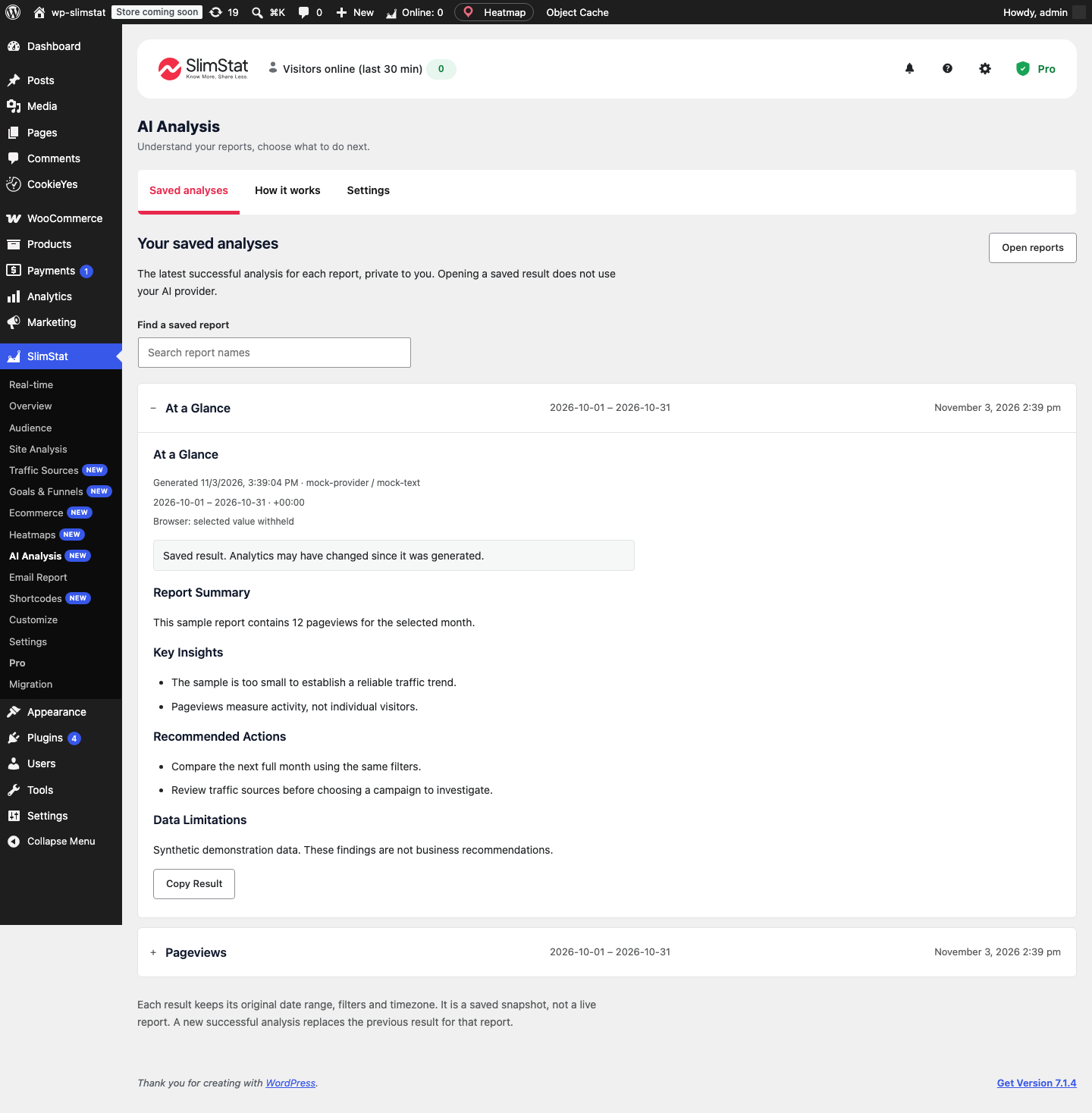
Demonstration screen with synthetic data and a mocked provider response. It illustrates the library, not a measured business outcome.
What native analysis sends
Native analysis withholds visitor identifiers, URLs and free-text labels. The provider receives bounded aggregate values and minimized context. SlimStat restores the report’s readable row labels locally when displaying the answer. Only reports the requesting user is allowed to view can be analyzed.
Ordinary Copy Prompt actions copy visible report content and site context for you to review; Ecommerce copying uses the minimized report data described above. Your chosen provider processes anything you submit, so check its data handling before use. Stored analysis is private to the current user and site, and deleting the user removes their saved results.
Troubleshooting
| What you see | Next step |
|---|---|
| Copy Prompt is absent | Check report permissions and remove filters that select an individual visitor. Individual-visitor reports are intentionally excluded. |
| Pro is locked or the site is not activated | Check license status and site activation. |
| Native AI is unavailable | Check WordPress 7.0+, native AI availability and your connected provider. Copy Prompt remains an alternative. |
| Model or access error | Select a text-generation model available to your provider account. |
| Quota or rate limit | Check provider billing or wait for the indicated retry period. |
| Timeout or connection error | Check outbound HTTPS and provider availability; use Retry when offered. A large report can also exceed execution limits. |
| Saved answer looks old | Check its generation date and original reporting period before regenerating. |
Want the answer and its history in your WordPress workflow? Compare Pro plans. Every plan includes the same AI feature; the site allowance differs.