
These 10 AI prompts for WooCommerce turn your SlimStat store reports into revenue decisions you can test. Each prompt names the report to open and the numbers to paste into an AI assistant such as ChatGPT, Claude or Gemini. Together they answer why sales changed, which channels and landing pages sell, which products get refunded, where discounts go and where buyers stop. The 23-second video above shows the whole loop.
Three of these prompts work with the free plugin today. Install SlimStat Free and start with prompts 1, 2 and 5.
| Prompt | Revenue question | SlimStat report | Edition |
|---|---|---|---|
| 1. Why sales changed | Did more orders or bigger orders move net sales? | Net sales, Orders, Average order value, Compare previous period | Free ✓ net sales · Pro split |
| 2. Channels that sell | Which channels bring the most net sales per order? | Acquisition › Channels, Sources | Free ✓ top 2 · Pro all |
| 3. Campaigns | Which campaigns should you scale, fix or stop? | Acquisition › Campaigns | Pro |
| 4. Landing pages | Which entry pages start buying visits? | Landing pages | Pro |
| 5. Products | Which products win, and which get refunded? | Shopping › Products | Free ✓ top 2 · Pro refunds and units |
| 6. Order value | Which test could raise your average order? | Average order value, Shopping › Products | Pro |
| 7. Coupons | Where does your discount money go? | Shopping › Coupons | Pro |
| 8. Devices | Do phones and desktops buy differently? | Audience › Devices | Pro |
| 9. Guest or account | Does account checkout change what people buy? | Audience › Customer segments | Pro |
| 10. Drop-off | Where do buyers stop, and what do you test first? | Purchase journey, Your next investigation | Pro |
Key takeaways
- Give the AI your own numbers, the dates and the currency, and tell it what Net sales means. A vague question gets vague advice.
- SlimStat Pro exports each report as a CSV of totals. With the free plugin, type in Net sales and your top two rows.
- Never paste an order export that holds customer names, emails or addresses.
- Ask for hypotheses and tests, not causes. Your reports show what happened, not why.
- Change one thing at a time, then compare the same length of time before and after.
Why generic AI store advice fails
Ask an AI “How can I increase my WooCommerce sales?” and you get a list that fits every store on earth: add reviews, speed up the site, send abandoned-cart emails. None of it is wrong. None of it is about your store.
The fix is to give the AI three things: your numbers, what those numbers mean, and one narrow question. Compare these two prompts:
Weak:   How can I increase my WooCommerce sales?

Strong: Here are my SlimStat Channels totals for Sep 27 to Oct 24, in USD.
        Net sales exclude tax and shipping. Which channel brings the most
        net sales per order, and what one test would you run on it?
        Use only these numbers.
The strong prompt can only be answered with your data, so the answer is about you. It also says how to read the numbers, so the AI cannot treat net sales as profit. If you want prompts for traffic rather than sales, the same idea runs through our AI prompts for website analytics.
What to give the AI, and what never to share
With SlimStat Pro, open SlimStat › Ecommerce, find the report a prompt needs and select Export. You get a CSV with the report name, each row, the currency, orders, net sales, net units, refunds, discounts, the period dates, a Basis column and a Data quality column. It holds totals only: no customer names, emails or order IDs. Attach it to the chat or paste its rows. Already own Pro but see Free reports? Install the add-on and activate your license.
With the free plugin, type the numbers in. Free shows Net sales with its trend against the previous period, and the net sales of your top two channels, sources and products. That is enough for prompts 1, 2 and 5.
Whatever you paste, always include:
- the currency, for example USD
- the dates, and the dates of the period you compare with
- what Net sales means (the context prompt below does this for you)
- the Basis and Data quality lines from the CSV, if you have them
Never paste an order export from WooCommerce itself, a customer list or anything with names, emails, phone numbers or addresses. The AI does not need them to answer any prompt here. Check your AI tool’s data settings too, so you know whether your chats are used to train its models.
If Ecommerce is not set up yet, the WooCommerce analytics setup guide takes a few minutes.
Start every chat with this store context
Paste this first, fill in the brackets, then paste any prompt below. It stops the most common mistakes before they happen: treating net sales as profit, coupons as revenue, or a missing journey step as a lost sale.
10 AI prompts for WooCommerce
The numbers under each prompt come from Bloom & Fern, a fictional flower shop with test orders, for Sep 27 to Oct 24, 2026, in USD.
1. Why did my sales change?
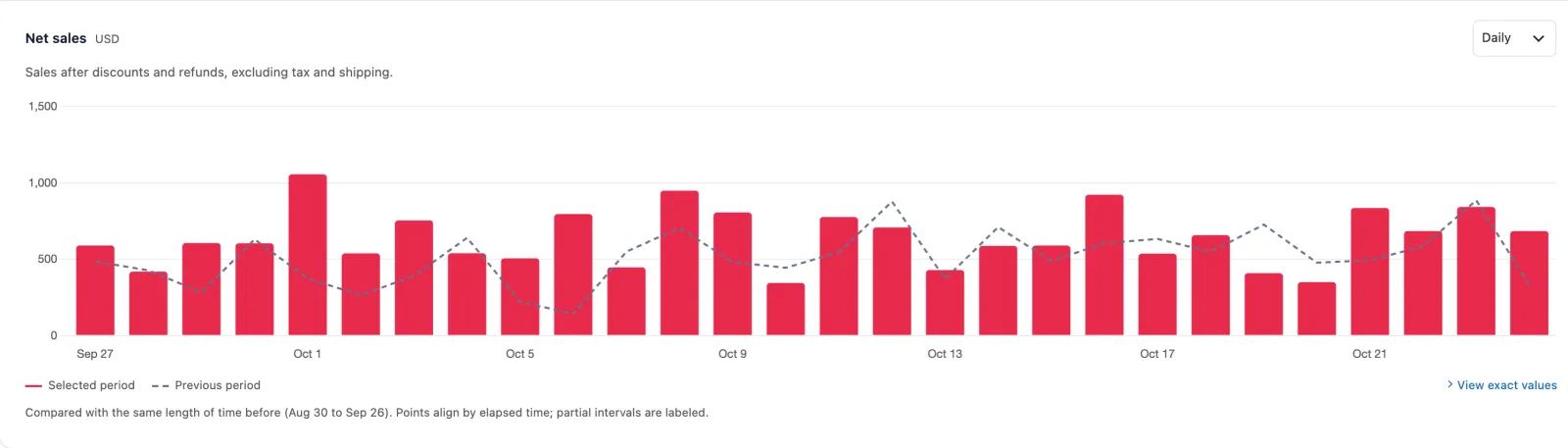
Prompt 1 reads the Net sales chart with Compare previous period to tell you whether more orders or bigger orders moved your sales.
Report it needs: SlimStat › Ecommerce, Net sales, with Compare previous period on. Pro adds Orders and Average order value. Free ✓
What to look for: Net sales = Orders × Average order value. A change has to come from one side or the other, or both. More orders points to traffic and channels. A bigger average order points to products, prices or bundles. One very high day can be a single large order, so ask the AI to name the days that stand out before it explains the trend.
SlimStat Pro 3 shown. Bloom & Fern demo store, test orders.
Do this next: Bloom & Fern made $17,966 in net sales, up 25.5% on the four weeks before, from 298 orders at about $60 each. Paste Orders and Average order value for both periods, so the AI can say which side moved. If orders moved, go to prompt 2. If order value moved, go to prompt 6.
2. Which channels and sources actually sell?
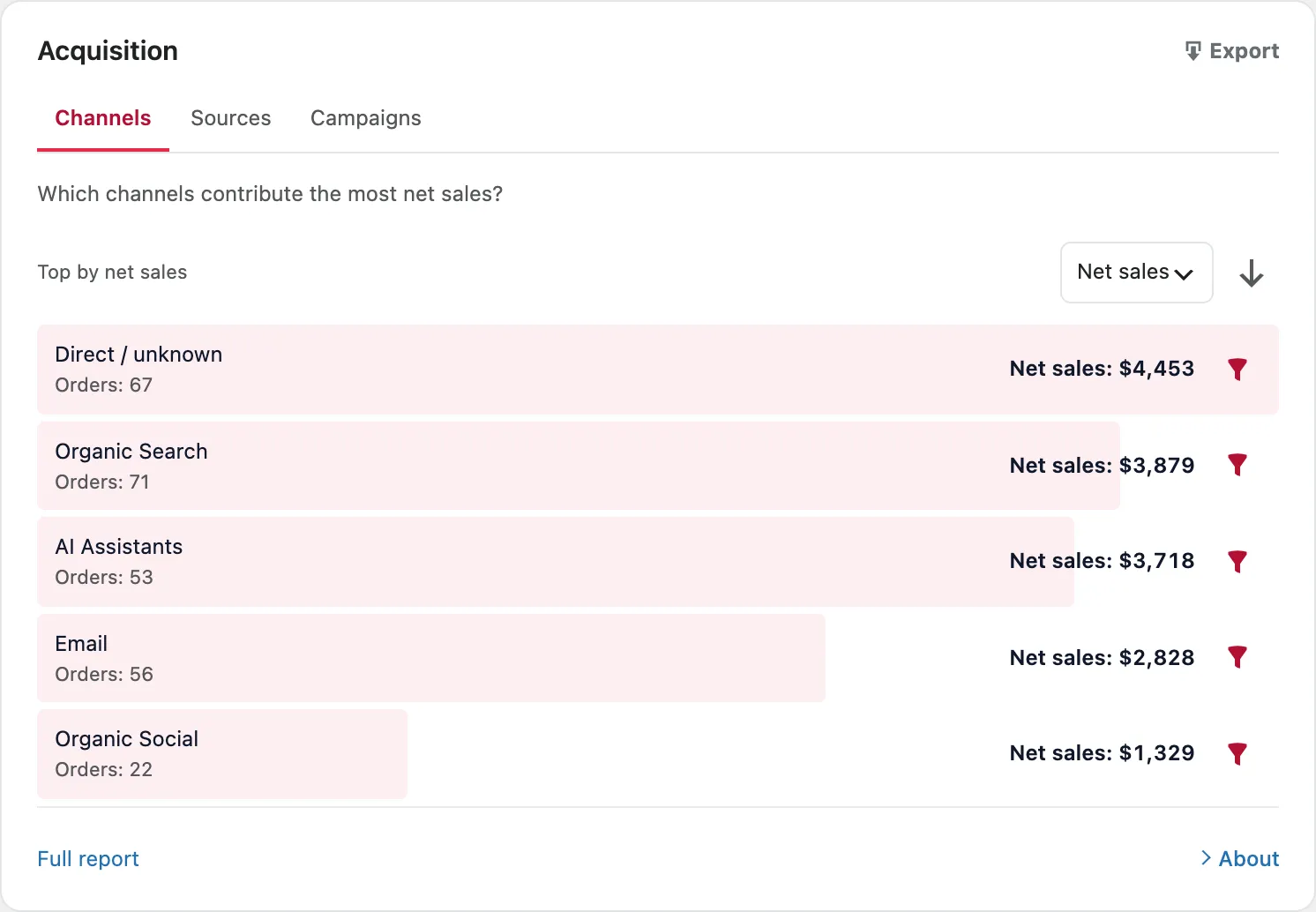
Prompt 2 reads the Channels and Sources reports to find the channel that brings the most net sales per order, not just the most visits.
Report it needs: Acquisition › Channels and Sources. Free ✓ shows net sales for your top two rows; Pro shows every row with orders.
What to look for: Two numbers per channel: how much it sells and how much each order is worth. A channel with fewer orders but a higher value per order can deserve more attention than the biggest one. “Direct / unknown” is a mix of typed visits, bookmarks and links SlimStat could not trace, so do not plan around it. How SlimStat decides which channel gets the order is explained in WooCommerce sales attribution.
SlimStat Pro 3 shown. Bloom & Fern demo store, test orders.
Do this next: AI Assistants brought $3,718 from 53 orders, about $70 each. Organic Search brought more, $3,879, but from 71 orders at about $55. Check which pages AI visitors land on (prompt 4) and test showing the premium bouquets first on those pages for two weeks.
3. Which campaigns should I scale, fix or stop?
Prompt 3 reads the Campaigns report to sort your UTM campaigns into scale, fix or stop by the net sales and orders each one brought.
Report it needs: Acquisition › Campaigns. Pro.
What to look for: Campaigns with fewer than about ten orders are too small to judge, so park them. Watch for the same campaign split across two names, such as “Autumn-Sale” and “autumn_sale”. That is a tagging problem, and it hides a campaign’s real total. Our guide to tracking UTM campaign parameters shows a naming scheme that keeps campaigns together.
Do this next: Pick two campaigns: the one with the most orders, and one with fewer orders but a higher net sales per order. Give the second one more room in your next email or post, keep everything else the same, and compare the next four weeks.
4. Which landing pages start buying visits?
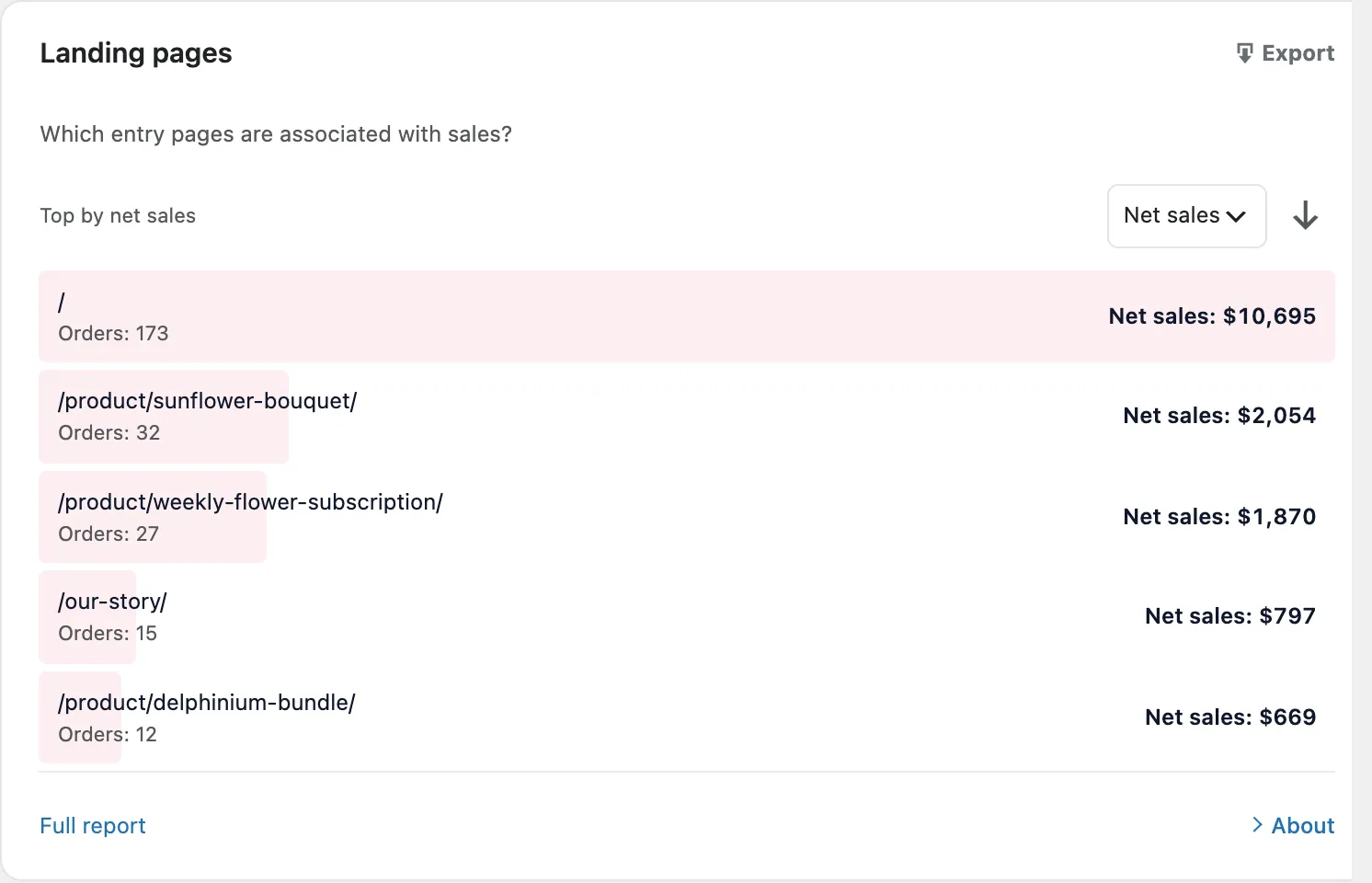
Prompt 4 reads the Landing pages report to find the entry pages most associated with sales, so you know where to put your best offers.
Report it needs: Landing pages. Pro.
What to look for: Your home page will lead because most visits start there. The interesting rows are below it. A product page that starts many orders is being found directly, often from search or AI answers, so it deserves the best photos and copy. A content page that starts orders is selling without being designed to.
SlimStat Pro 3 shown. Bloom & Fern demo store, test orders.
Do this next: Bloom & Fern’s /our-story/ page started 15 orders, about $53 each, with no product on it. Add a short “Our best sellers” block linking the subscription and the sunflower bouquet, then compare the next four weeks.
5. Which products win, and which get refunded?
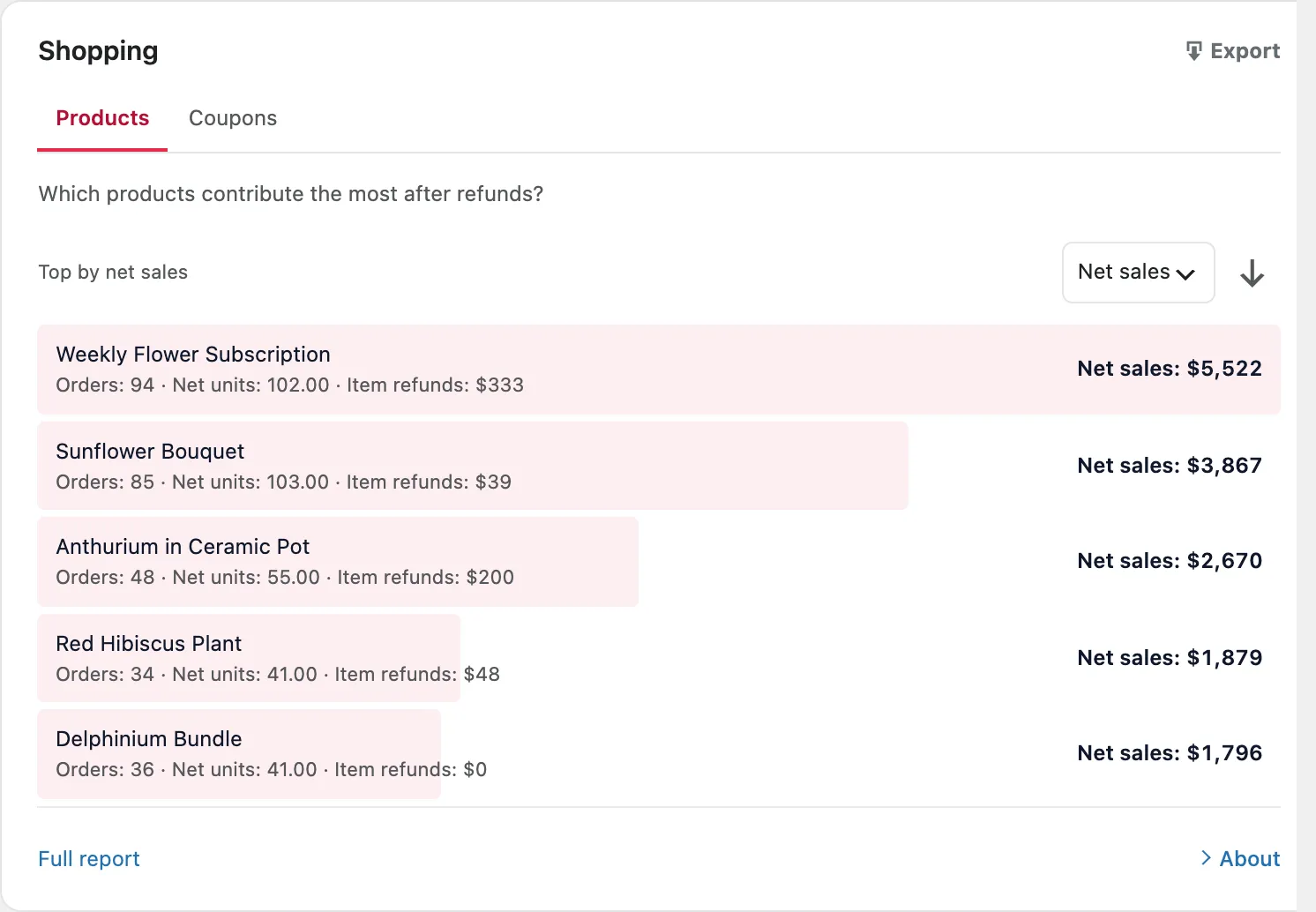
Prompt 5 reads the Products report to separate the products that earn the most after refunds from the ones that keep coming back.
Report it needs: Shopping › Products. Free ✓ shows net sales for your top two products; Pro adds orders, net units and item refunds for every product.
What to look for: A best seller with high refunds may be earning less than it looks, and every return costs you time and shipping that net sales never show. Compare refunds with net sales per product, not refunds alone. Big products will always have bigger refund totals.
SlimStat Pro 3 shown. Bloom & Fern demo store, test orders.
Do this next: Anthurium in Ceramic Pot refunded $200 against $2,670 in net sales, about 7.5%. Sunflower Bouquet refunded $39 against $3,867, about 1%. Read the refund notes in WooCommerce for the anthurium orders before you put it in your next campaign. A pot that breaks in transit is a packaging fix, not a product problem.
Free or Pro: which prompts can you run?
| SlimStat Free | SlimStat Pro | |
|---|---|---|
| Net sales and its trend against the previous period | ✓ | ✓ |
| Orders, Average order value, Purchase rate (tracked visits) | ✓ | |
| Channels, Sources, Products | Top 2 rows, net sales | Every row, with orders, units and refunds |
| Campaigns, Landing pages, Devices, Customer segments, Coupons | ✓ | |
| Purchase journey and Your next investigation | ✓ | |
| CSV export of each report | ✓ | |
| Ecommerce in scheduled email reports | ✓ | |
| Prompts you can run | 1, 2 and 5 | All 10 |
Prompts 6 to 10 need Pro’s reports. See everything SlimStat’s WooCommerce analytics show.
6. How can I raise my average order value?
Prompt 6 reads Average order value with the Products report to plan bundle and free-shipping tests that could raise what each order is worth.
Report it needs: Average order value, plus Shopping › Products. Pro.
What to look for: Products that fit together naturally, such as a plant and a pot, or a bouquet and a vase. Units per order matter too: Bloom & Fern’s subscription sold 102 units across 94 orders, so a few people already buy more than one.
Do this next: Bloom & Fern’s average order is about $60. A free-shipping threshold a little above that, say $70, is a fair two-week test. Watch Orders and Average order value together: a threshold that raises the average but cuts orders has not helped. Shipping is not part of net sales, so free shipping does not show up as lost sales here; check its cost in your own books.
7. Where do my discounts go?
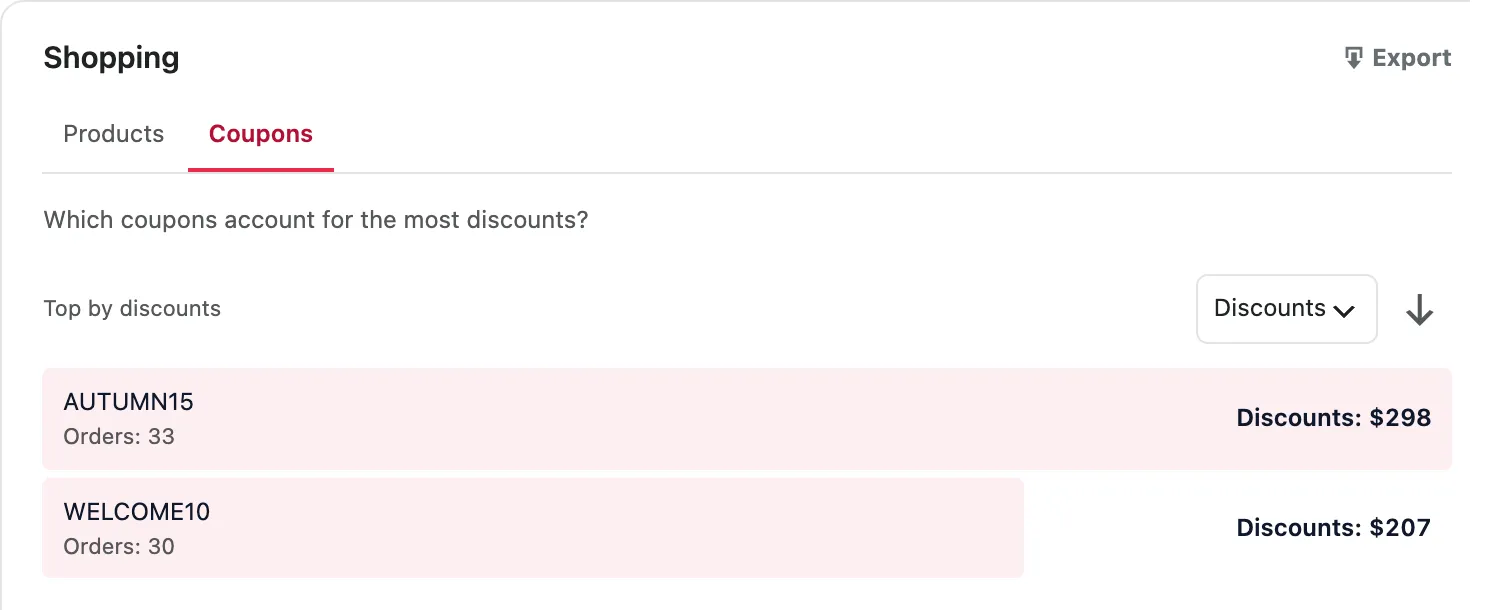
Prompt 7 reads the Coupons report, sorted Top by discounts, to show where your discount money goes. It shows exposure, not whether a coupon paid off.
Report it needs: Shopping › Coupons, Top by discounts. Pro.
What to look for: Which codes give away the most, and how much per order. A welcome code used by many people may be leaking onto coupon sites. A seasonal code that runs past its season is a discount nobody planned.
SlimStat Pro 3 shown. Bloom & Fern demo store, test orders.
Do this next: AUTUMN15 gave away about $9 per order across 33 orders, WELCOME10 about $7 across 30. Send half of your next autumn email without the code and compare orders from the two halves. That is the only way to learn whether the code brought sales or only discounted them.
8. Do phones and desktops buy differently?
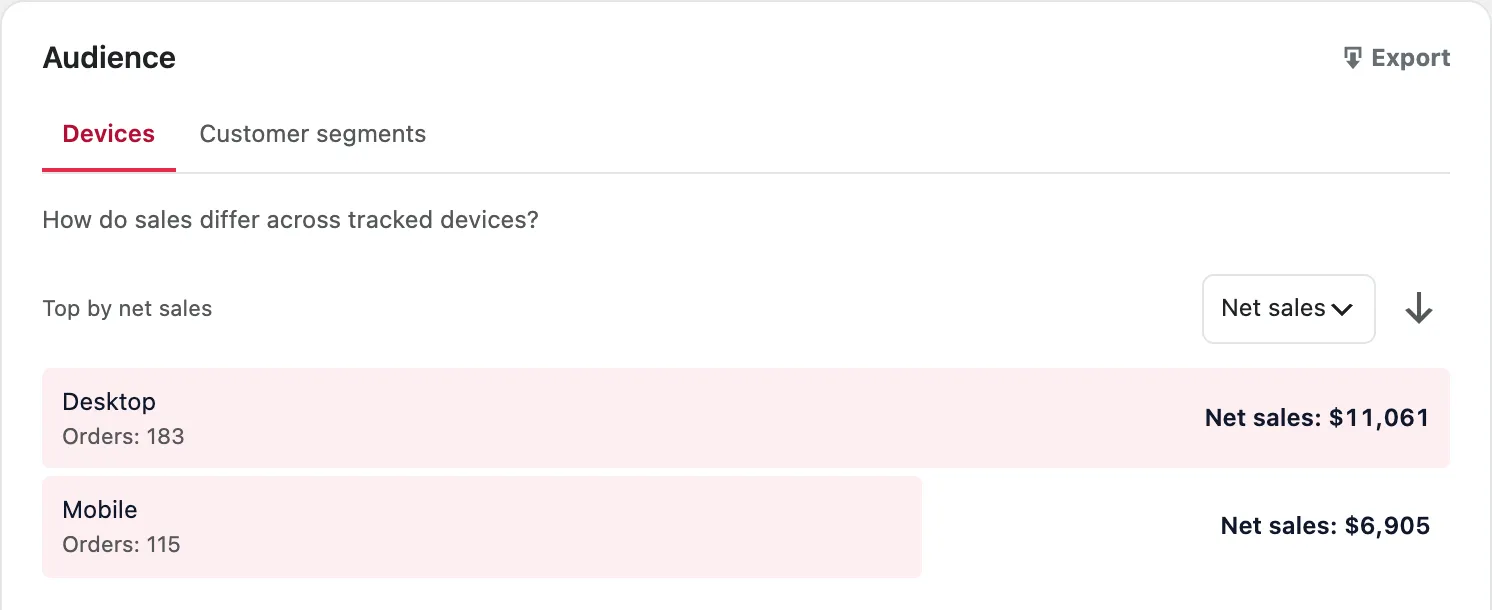
Prompt 8 reads the Devices report to compare what phone and desktop visitors spend. A gap is an observation; the cause is a hypothesis.
Report it needs: Audience › Devices, plus visits by device from your SlimStat traffic reports. Pro.
What to look for: Two different gaps. If phones order less often, look at the path to checkout on a small screen. If phones order as often but spend less, look at how bigger items and bundles show on mobile. People also browse on a phone and buy later on a laptop, which looks like two visitors, so a phone gap is never the whole story.
SlimStat Pro 3 shown. Bloom & Fern demo store, test orders.
Do this next: Bloom & Fern’s phones placed 115 orders and desktops 183, and both averaged about $60. So the gap is in how many people order, not what they spend. If phones bring more than 39% of your visits, place a test order on your own phone this week and note every step that slows you down.
9. Does guest or account checkout change what people buy?
Prompt 9 reads the Customer segments report to compare guest orders with orders from registered accounts, and to choose what to test in your checkout.
Report it needs: Audience › Customer segments. Pro.
What to look for: The split tells you who your checkout serves today. If most orders are guest orders, forcing an account would put a step in front of most of your buyers. The reasons in the prompt come from Baymard Institute’s research on checkout abandonment, which asks shoppers why they left. They are reasons to check, not a diagnosis of your store.
Do this next: Make sure guest checkout is on and the account box is optional. If registered accounts spend more per order, offer account creation after payment, on the order confirmation page, rather than before it.
10. Where do buyers drop off?
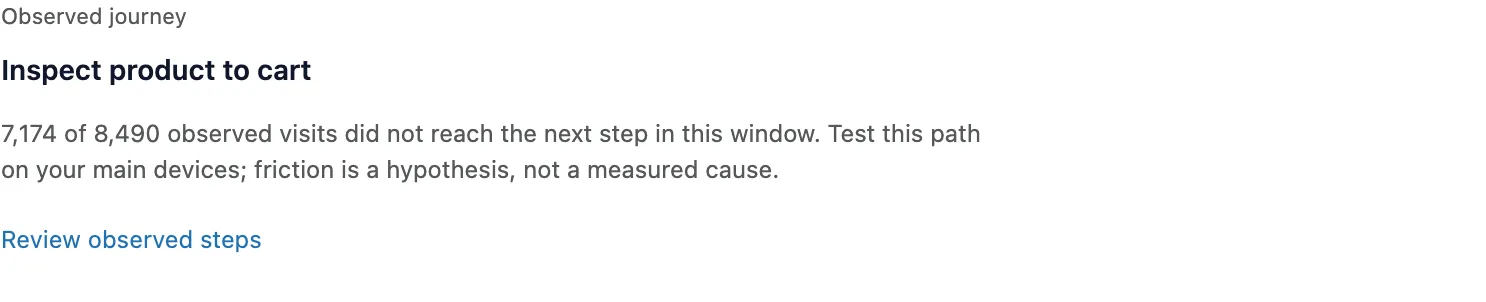
Prompt 10 reads the Purchase journey and Your next investigation to find the step where most shopping visits stop, and the first thing to test there.
Report it needs: Purchase journey and Your next investigation. For the last steps over time, the Checkout completion funnel template in Goals & Funnels. Pro.
What to look for: The step with the most visits lost, not the worst percentage. Losing half of 648 checkouts matters less than losing 85% of 8,490 product views. The journey counts visits SlimStat observed, so it starts on the day you set Ecommerce up. More on reading it in our guide to the WooCommerce conversion rate.

SlimStat Pro 3 shown. Bloom & Fern demo store, test orders.
SlimStat Pro 3 shown. Bloom & Fern demo store, test orders.
Do this next: At Bloom & Fern, 7,174 of 8,490 product visits never reached the cart. Start on the product page: on a phone, can you see the price, the delivery date and the add-to-cart button without scrolling? Then set up the Checkout completion funnel (Cart → Checkout → Order received) in Goals & Funnels to watch the last steps week by week.
Bonus: the AI ecommerce growth analyst prompt
When you have several reports at once, a monthly review for example, use this one prompt instead of ten. Attach your CSVs or paste their rows where it says so.
Turning answers into revenue
An AI answer is a list of ideas. Revenue comes from the tests you run afterwards. Three habits keep those tests honest:
- Change one thing at a time. If you add a bundle, a coupon and new photos in the same week, you will not know which one worked.
- Compare like with like. Use the same length of time before and after, and the same days of the week. Read the counts as well as the percentages: a jump from 3 orders to 6 is 100%, and it is also three orders.
- Make it a weekly loop. Add Ecommerce to your SlimStat Pro email reports, so the totals arrive every Monday. Paste them into prompt 1, pick one test, and check it the next Monday.
What these prompts cannot tell you
Good prompts make the AI more careful, but they cannot add data you do not have.
- Profit, return on ad spend and lifetime value. SlimStat knows net sales, not what your products, shipping or ads cost. Add costs yourself if you need these.
- Journeys across devices. Someone who browses on a phone and pays on a laptop looks like two visitors. SlimStat does not link them.
- History from before setup. Imported past orders count in net sales, but the purchase journey and visit links only start on the day Ecommerce was set up.
- Small samples. A product with four orders can swing from best to worst in a week. Ask the AI to flag small rows, and wait for more orders before acting on them.
- Old data. SlimStat removes analytics older than your retention setting, 420 days by default, and store figures follow the same rule.
- The AI’s own mistakes. Assistants get arithmetic wrong. Ask for the calculation, and check any number you plan to act on against the report.
FAQ
Which AI tool should I use?
Any chat assistant that can read a pasted table or an attached CSV file works, including ChatGPT, Claude and Gemini. The prompts are plain text, so they behave much the same in each. Use the store context prompt first in every new chat.
Is it safe to paste my store data into an AI tool?
Totals are fine; customer details are not. The Pro CSV export holds totals only: no customer names, emails or order IDs. Do not paste WooCommerce order exports or customer lists. Check your AI tool’s data settings to see whether chats are used for training.
Do these prompts work with the free plugin?
Yes, prompts 1, 2 and 5. Free shows Net sales with its trend against the previous period, and the net sales of your top two channels, sources and products. The other seven prompts need Pro’s reports. Compare the plans to see what each includes.
Can AI tell me why my sales dropped?
Not with certainty. Your reports show what changed and where. The AI can suggest reasons, but each one is a hypothesis until a test confirms it. The prompts here ask for hypotheses and checks for exactly that reason.
How often should I run these prompts?
Prompt 1 once a week, when your email report arrives. The master prompt once a month. The others when prompt 1 points at their area: channels when orders move, products and order value when the average order moves.
Why don’t my numbers match WooCommerce’s own reports?
They can count differently. SlimStat’s Net sales leave out tax and shipping, count processing, completed and refunded orders, and move each refund back to its original order. Tell the AI which tool a number came from, and do not mix the two in one prompt.